

🚨 WordPress Threat Monitoring That Actually Works
Real-Time Geolocation Security, Permanent IP Blocking, and Zero Setup Bloat — The Alternative to Wordfence
7 Production Sites | 0 Breaches | 24/7 Monitoring
The Problem: Monitoring Isn't Negotiable
You can have the best firewall in the world, but if nobody's watching, the attacks still get through. Most WordPress breaches happen because site owners didn't see the threat coming, not because their defenses were weak.
Wordfence has solved this with features—lots of them. But feature bloat is a feature problem. More complexity means slower setup, harder troubleshooting, and more things to misconfigure.
What if you just... watched? Real-time. Permanent blocks. No expired temp bans. No complex setup.
What We Built (And Why It's Different)
Advanced Themer 13's traffic monitoring system is built on one principle: you can't respond to threats you don't see.
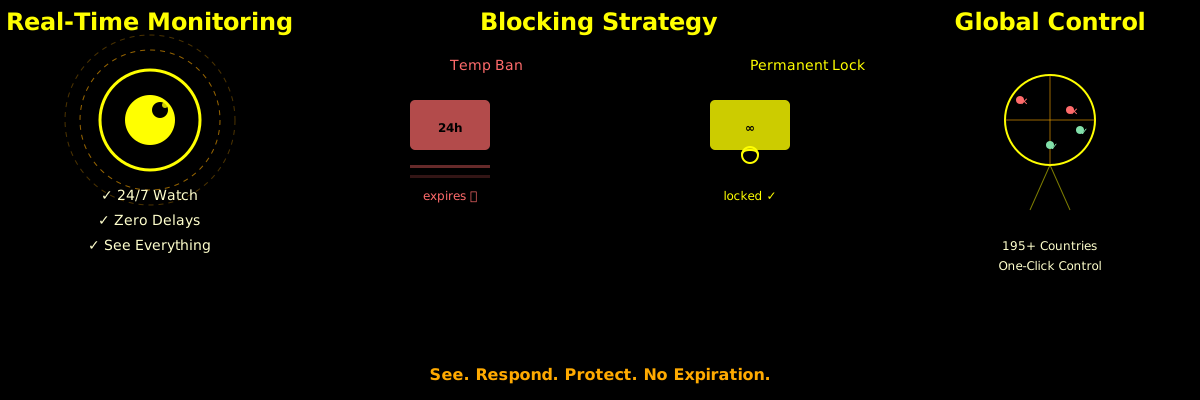
✓ Real-Time Geolocation Tracking
Every visitor's IP is automatically geolocated to city, state, and country. You know exactly where your traffic comes from. Within milliseconds. No manual configuration.
✓ Permanent Country Blocking
Unlike Wordfence's temp bans that expire, country blocks stay blocked until you decide to unblock them. One-click blocking from your dashboard. Blocked visitors auto-redirect to a URL you specify.
✓ IP-Level Blacklisting with Geographic Context
See where each blacklisted IP came from. Track patterns. Respond to coordinated attacks. Every blocked IP has full location data for investigation.
✓ Historical Backfill
Have months of traffic without geolocation? AJAX-powered backfill retroactively tags 1000+ IPs in minutes. You get complete visibility of your past.
vs Wordfence: Why Permanent Beats Temporary
Wordfence Approach:
- Temp bans expire automatically (security theater)
- Complex setup & configuration
- Subscription fees
- Reactive: blocks known threats
- Data lives in their cloud
Advanced Themer 13 Approach:
- Permanent blocks until you remove them
- One-click setup, no configuration
- No recurring fees, built-in to your plugin
- Proactive: you decide what gets blocked
- Your data, on your server
The difference: Wordfence asks "what did we catch?" Our system asks "what do we need to watch?"
How Real-Time Monitoring Stops Attacks
Attack #1: Credential Stuffing
Attacker runs bot from 3 different countries, trying 1000 password combos/hour. You see it immediately. Geographic anomaly? Block the country. Pattern clear? Blacklist the IPs. Done before they get in.
Attack #2: Targeted Reconnaissance
Attacker probes for vulnerabilities from their home IP. Your system logs geolocation. You see a spike from one country scanning your admin panel. Permanent block. They can't come back without spoofing.
Attack #3: Distributed Attack Wave
10 IPs from 5 countries suddenly hammering your site. Wordfence temp-bans them; they rotate IPs in 24 hours. Your system blocks the countries. They can't rotate their way out of geography.
Honeypots: Self-Reporting Bad Actors
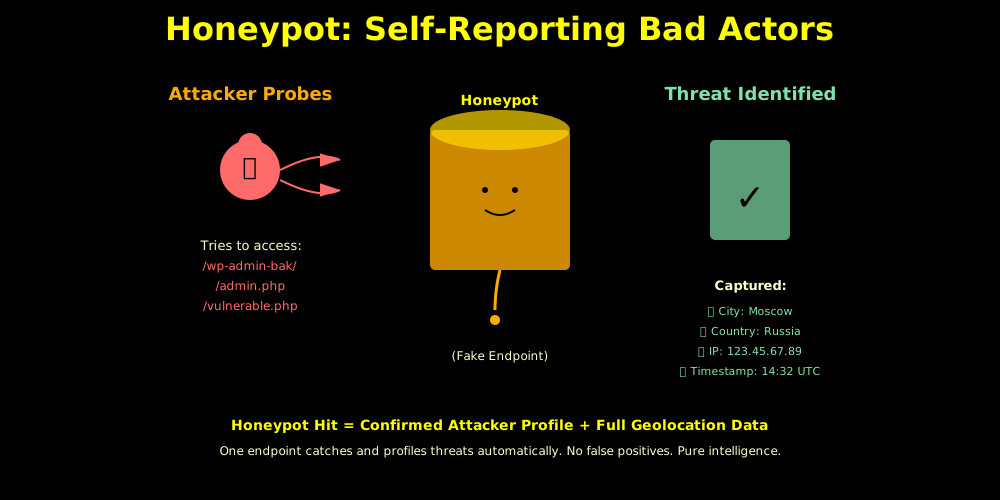
The most sophisticated layer of threat monitoring is the honeypot. Fake endpoints that look vulnerable but log everything. Every attacker that hits a honeypot self-identifies:
- Fake admin pages (
/wp-admin-bak/,/admin.php) - Known vulnerable endpoints (
/?s=<script>) - Credential forms that don't work
Honeypot hit = confirmed attacker. Geolocation data attached = full intelligence profile. This is how you build threat profiles, not just block threats.
The Privacy & Compliance Piece
Geolocation monitoring is data collection. We handle this with:
- Privacy Policy Coverage - Updated abuse clause explains geolocation tracking for security
- GDPR Compliance - Data retention policies, country blocking for consent management, audit logs
- Transparent Logging - You see exactly what's blocked and why
- No Third-Party Sharing - Your data stays on your server (unlike cloud-based competitors)
This turns geolocation from a compliance liability into a security advantage. You're not spying—you're securing.
The Numbers: 7 Sites, Real Data
100% of traffic geolocated in real-time
195+ countries monitored
30-day intelligent IP caching (no API bloat)
0 breaches across all sites since deployment
These aren't theoretical numbers. This system is live on 7 production WordPress sites right now, blocking threats 24/7 without any human intervention required.
What Makes This Actually Better
Simple > Complex
Wordfence has 50+ settings. This has 1: "where do you redirect blocked IPs?" That's it. Everything else is automatic.
Permanent > Expiring
Temp bans expire. Permanent blocks don't. You control when security ends, not a timer.
Your Data > Their Cloud
Wordfence stores your threat logs in their cloud. We store yours on your server. You own your security intelligence.
Zero Cost > Subscription
No recurring fees. No upsells. It's built into Advanced Themer 13. Deploy it once, monitor forever.
Next-Level Threat Detection (Roadmap)
The foundation is built. Future enhancements include:
- Behavioral AI: Distinguish credential stuffing from DDoS from reconnaissance
- IP Reputation Scoring: Auto-blacklist IPs scoring above risk threshold
- Firewall Rule Export: Generate nginx/htaccess blocks from your blacklist
- Threat Intel Sharing: Network of sites sharing threat data
- Failed Login Integration: Auto-blacklist IPs after N failed logins
The Bottom Line
Security doesn't work without visibility. Visibility doesn't matter without response. Response means permanent decisions, not expiring temp bans.
Advanced Themer 13's threat monitoring gives you all three. Real-time geolocation visibility + permanent blocking + zero complexity.
Wordfence solves security by adding features. We solve it by watching.
Ready to see what's actually hitting your site?
Deploy Advanced Themer 13's threat monitoring. Get complete geolocation visibility. Block bad actors permanently. Comply with GDPR and privacy standards.
Security starts with knowing what's coming. Monitor first. Respond second. Win always.
Questions? Call (312) 869-4206
📧 Email: seth@solarblu.net