
🔧 Advanced Themer: WordPress Management Made Easy
The Problem: WordPress Management is Fragmented
Every WordPress site needs backups, analytics, and content management. But the tools are scattered:
- Backups are either manual or handled by separate plugins
- Traffic analytics require external services like Google Analytics
- Post performance data is hidden in multiple places
- Custom CSS for individual posts requires manual workarounds
- Media uploads are tedious to catalog and share
This fragmentation wastes time, increases complexity, and leaves sites vulnerable.
The Solution: Advanced Themer Suite
We engineered Advanced Themer to consolidate WordPress management into a single, purpose-built interface. Every feature was designed with one principle: make expert-level site management accessible to everyone.
📊 Content Views Analytics
Track post and page performance in real-time. See daily, weekly, and monthly views. Identify your top-performing content instantly. Sort by traffic period to spot trends.
💾 Automated Backups
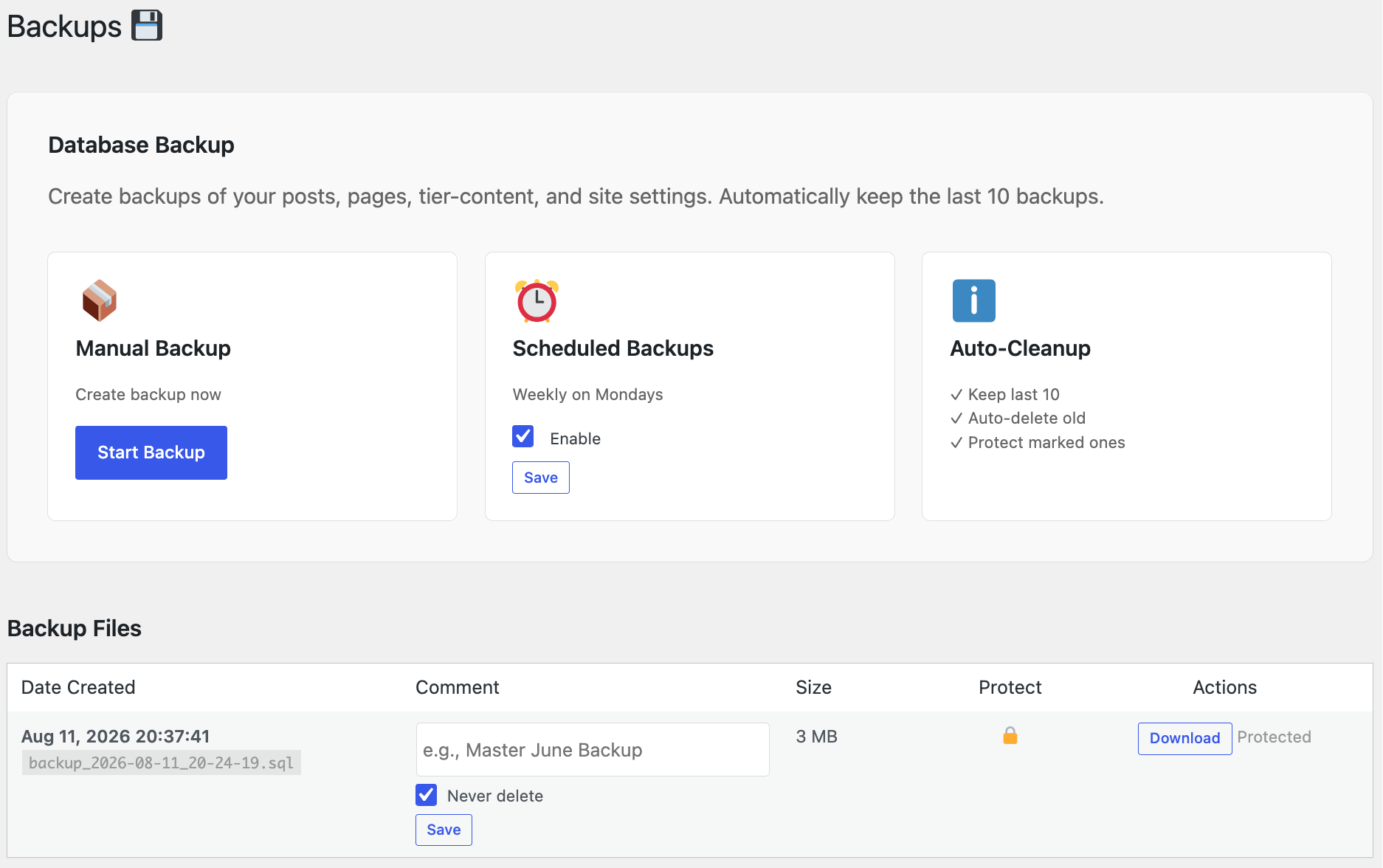
Weekly backups run automatically every Monday. Keep the last 10 backups. Mark critical backups as "never delete." Add comments like "Master June Backup" for easy identification.
📸 Recent Uploads Tracker
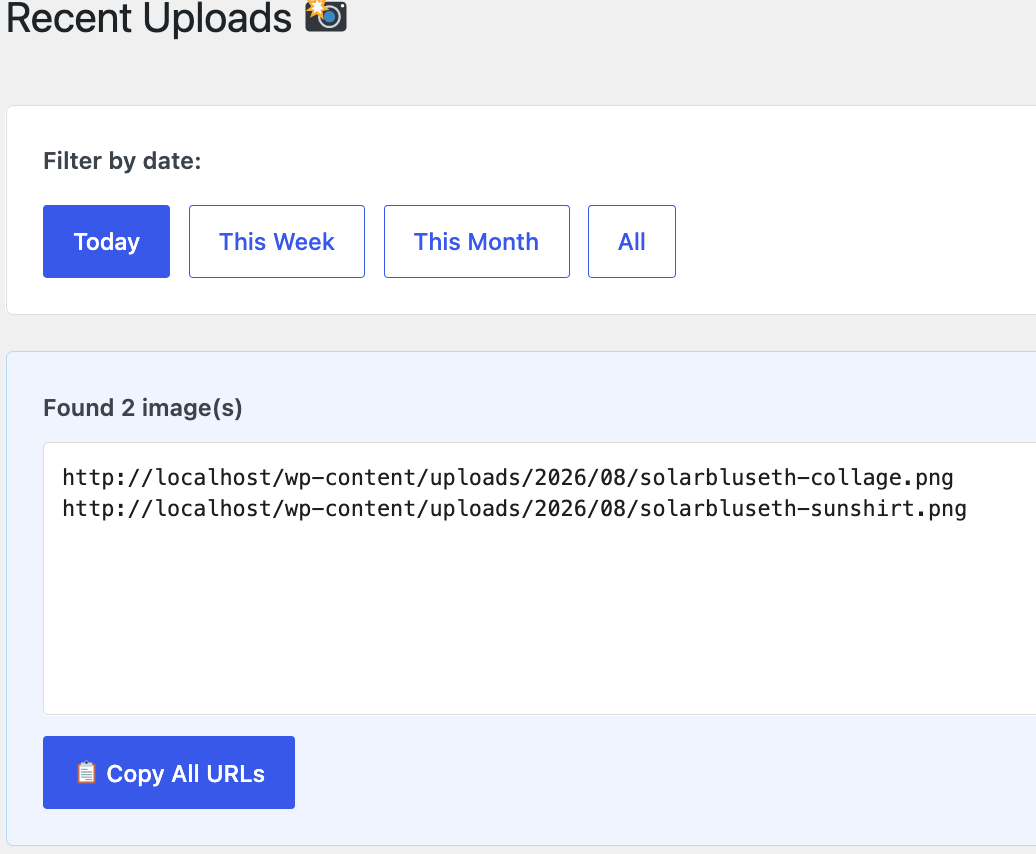
See all images uploaded today, this week, or this month. Copy all URLs with one click. Share media lists with developers or AI assistants instantly—no more manual linking.
🎨 Post-Specific CSS
Add custom CSS directly to individual posts or pages. No more broken formatting from newlines. CSS is stored safely as post metadata and loaded only for that content.
🔐 Secure File Storage
Backups stored outside the web root. Protected by .htaccess. Downloaded through PHP (not direct file access). WordPress nonce verification on all actions.
⚡ One-Click Recovery
Download backups as clean SQL files. Import into any database tool. No decompression needed. Restore your site in minutes, not hours.
Feature Breakdown: What You Get
1. Content Views Analytics Dashboard
Stop guessing what content performs. The Content Views dashboard shows:
- Daily trends — 30-day line chart showing posts vs. pages vs. total views
- Quick stats — Today, this week, this month at a glance
- Top posts/pages table — Ranked by total views with breakdowns by time period
- Post type clarity — Know instantly if traffic is coming from posts or pages
- Sort by period — Click "Today" to see which content is hot right now
No external analytics required. Data is tracked natively, stored securely, and updated in real-time.
2. Automated Backup System with Scheduling
Backups are non-negotiable. But manual backups fail. Advanced Themer automates the entire process:
- Weekly scheduling — Every Monday at 2 AM, automatically backs up your database
- Smart retention — Keeps last 10 backups, auto-deletes old ones to save space
- Never-delete flag — Mark critical backups to protect them from auto-cleanup
- Comments & labels — Add descriptive notes: "Pre-launch", "Master June", etc.
- One-click downloads — Get clean SQL files ready for import
- Delete protection — Toggle "Protect" to prevent accidental deletion
⚠️ Why This Matters
A single ransomware attack costs an average business $5,600. Most recover takes days without backups. Advanced Themer's automated approach means recovery takes minutes, not weeks. Backups are your insurance policy—make sure it runs automatically.
3. Recent Uploads Media Tracker
Upload images? Need to share them with your dev team or AI assistant? Advanced Themer's Recent Uploads tracker makes it effortless:
- Filter by date — Today, this week, this month, or all
- Thumbnail previews — See your images at a glance
- One-click copy all — Copy all image URLs as plain text, ready to paste into chat or documentation
- Image info — Dimensions, file size, upload date
- Individual copy buttons — Copy single URLs when needed
Upload 50 images for a blog post or product gallery? Copy all URLs in one click. No manual linking. No forgotten images. Perfect for collaborating with developers and content creators.
4. Post-Specific CSS Meta Box
WordPress's content editor mangles CSS—it converts newlines to <br> tags, breaking stylesheets. Advanced Themer solves this with a dedicated CSS meta box:
- Clean CSS storage — Stored as post metadata, not in content
- No formatting issues — Newlines and spacing preserved exactly
- Per-post scope — CSS only affects that specific post or page
- Works with tier-content — Add CSS to Tier Content posts too
- Auto-scoped selectors — Use `.post-123` to target specific content
Perfect for custom styling on individual posts without touching the theme. CSS loads in the page footer, ensuring clean separation.
Why Choose Advanced Themer?
1. Purpose-Built, Not Cobbled Together
Most WordPress sites use 5-10 different plugins for what Advanced Themer does in one. Each plugin adds weight, security surface area, and complexity. We built one integrated suite instead.
2. Security by Design
- Backups stored outside the web root (not in public_html)
- .htaccess protection prevents direct file access
- PHP-streamed downloads (no direct HTTP exposure)
- WordPress nonce verification on every action
- Admin-only capability checks throughout
- No external dependencies or third-party services
3. Developer-Friendly
Whether you're a solo developer or managing 100 sites:
- View real traffic data without Google Analytics setup
- Quick CSS edits per-post without theme modifications
- Media lists for AI content generation
- Backup schedules you can trust to run themselves
4. Enterprise-Grade Without the Complexity
Large teams need reliable systems. Advanced Themer delivers:
- Automatic weekly backups with full audit trail
- Content performance tracking across all posts and pages
- Centralized media management for distributed teams
- Protected backups that can't be accidentally deleted
Real-World Impact
Scenario 1: Content Creator
Before: Upload 40 images. Manually copy each URL into a spreadsheet. 30 minutes lost.
After: Upload 40 images. Go to Recent Uploads. Click "Copy All URLs". Paste into document. 2 minutes total.
Scenario 2: Development Team
Before: Site goes down. Find backup plugin. Download backup. Decompress it. Import to database. Troubleshoot for hours. Restore from scratch.
After: Site goes down. Open Advanced Themer backups. Download this morning's backup (clean SQL). Import to database. Restore and test. 15 minutes.
Scenario 3: Marketing Manager
Before: "Which blog posts drive the most traffic?" Check Google Analytics. Wait for it to load. Cross-reference URLs. Spend 20 minutes guessing.
After: Open Content Views tab. Sort by "This Week". See top 5 posts instantly. Spend 1 minute making data-driven decisions.
Get Started Today
Advanced Themer is built into SolarBlu's WordPress infrastructure. It's available as a plugin for your site. Start with automated backups this week. You'll wonder how you managed without it.
Stop juggling plugins. Stop manual backups. Stop guessing which content performs. Advanced Themer gives you one dashboard, one system, one source of truth.
Expert WordPress management. Made simple.
Questions? Advanced Themer is actively maintained and updated. Built by developers, for developers and site managers who demand reliability.