
From Visual Composer to Elementor One: How AI Made Our Team 3x More Productive
Our Real Migration Story: Moving from Confusing HTML Blocks to Intuitive Page Building with Claude & Angie Code
For years, we built client sites using Visual Composer. It worked. But it had limitations that frustrated our team. Complex HTML blocks that confused non-technical team members. Fragile pages where one wrong edit could break everything. And workflows that required developers to build anything custom.
Then we made the move to Elementor, combined it with Claude for JSON template generation, and added Angie Code for AI-powered widget building. The transformation was immediate—and dramatic.
In this post, I'll walk you through exactly what changed, how we integrated Claude into our workflow, why Angie Code became our secret weapon, and the concrete results our team experienced. If you're considering migrating from Visual Composer or looking to empower your team with better tools, this is for you.

Sound familiar? Visual Composer frustrations can create team tensions.
The Visual Composer Problem: Why We Needed a Better Solution
Visual Composer served us well for years, but cracks started showing as our team grew. Here's what we kept running into:
Visual Composer's Core Issues
- One Confusing HTML Block: Want to edit content? You're looking at a massive, intimidating HTML blob. Non-technical team members would panic and often break things without realizing it.
- Fragile Pages: One wrong character deletion, one misplaced bracket, and the entire page structure could crumble. We'd have to rebuild from backups.
- Custom Widget Bottleneck: Need a custom widget or HTML component? Only developers could build it. Every request meant scheduling developer time, waiting days or weeks.
- Intimidating Interface: The editor felt overwhelming to non-technical team members. They'd avoid making edits because they were afraid of breaking something.
- Limited Scalability: As we took on more projects and hired more team members, training them on VC became increasingly difficult. Everyone had different comfort levels.
- No Clear Structure: There was no visual, intuitive way to see the page structure. Everything lived in that one HTML block.
Our workflow looked like this:
Old Visual Composer Workflow
We needed a solution that was:
- Intuitive enough for non-technical team members
- Safe—edits shouldn't risk breaking the entire page
- Fast—custom components shouldn't require developer intervention
- Collaborative—multiple team members should be able to work on the same page
That's when we decided to migrate to Elementor.
Why We Chose Elementor: The Advantages Were Clear
When we started evaluating alternatives to Visual Composer, Elementor stood out immediately. But the decision became urgent when we faced a critical problem: a vendor plugin conflicted with Visual Composer, forcing us to act.
The Crisis: Plugin Conflict Forced Our Hand
We had been running Visual Composer for years without major issues. Then one of our key vendor plugins—a critical tool for client workflows—started conflicting with VC. The plugins weren't compatible anymore.
We had three options:
- Drop the vendor plugin and lose critical functionality
- Stop updating either plugin and accept security/compatibility risks
- Migrate to a different page builder that didn't have the conflict
None of those options were acceptable. So we made the jump to Elementor—but that came with a massive challenge: we had to migrate 85 custom landing pages to Elementor.
The Migration Challenge: 85 Custom Pages
Most people would see migrating 85 pages as a nightmare. We saw it as an opportunity to completely revamp our workflow. But first, we had to figure out how to do it efficiently.
The Problem
Each of those 85 pages was built with Visual Composer's HTML blocks. Manually rebuilding each one in Elementor would have taken months and cost a fortune. We needed a smarter approach.
Our Solution: Systematic Migration + AI
Instead of manually rebuilding, we:
- Analyzed the structure of our VC pages
- Identified common patterns and components
- Used Claude to help generate Elementor-compatible JSON for similar page layouts
- Built templates in Elementor based on these patterns
- Migrated pages in batches, using templates as the foundation
- Customized individual pages from the template base
This approach let us migrate 85 pages in weeks instead of months. And because we were doing it systematically, we actually improved the pages in the process—cleaning up old designs, modernizing layouts, and building consistency.
Why Elementor Solved Our Problem
Once we committed to the migration, it became clear why Elementor was the right choice for our situation:
Compatibility
- No conflicts with vendor plugins
- Active, ongoing support
- Community-driven ecosystem
Migration Viability
- Template system made bulk migration possible
- JSON import capability (crucial for us)
- Clear structure made it easier to rebuild
But the real advantage came after the migration was complete. That's when we discovered that Elementor + Claude + Angie Code transformed not just our ability to migrate pages, but our entire workflow going forward.
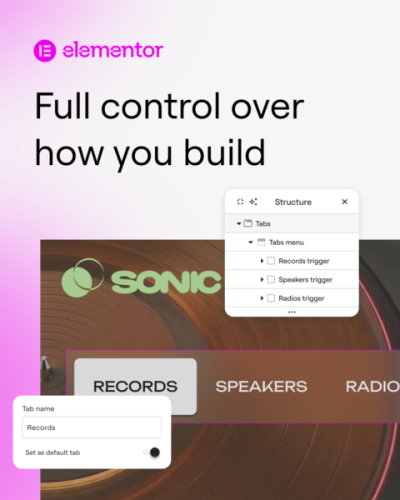
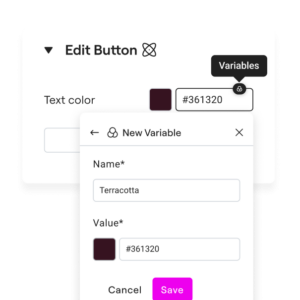
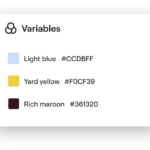
Elementor Features in Action
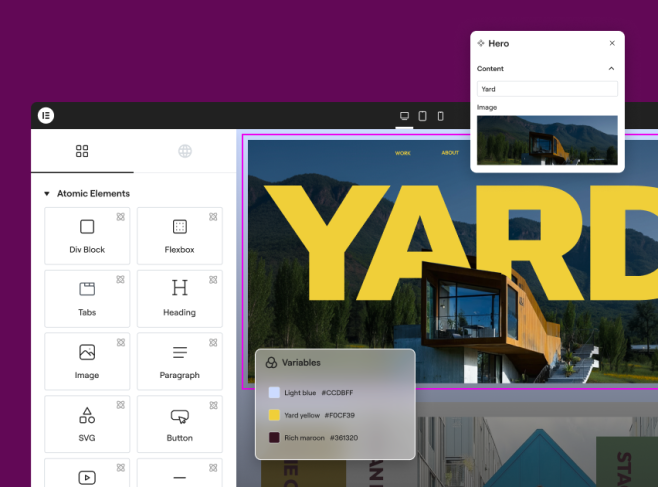
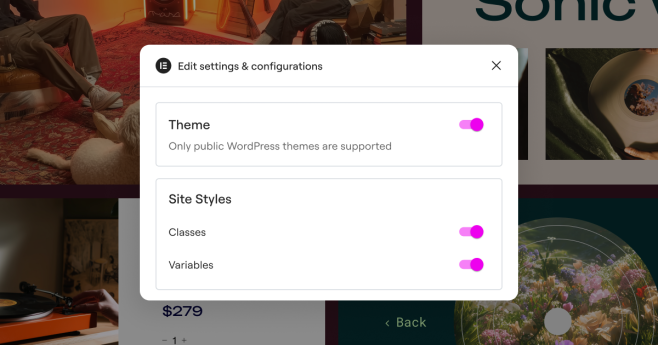
Here's a visual look at some of the key Elementor capabilities that made our migration and ongoing workflow possible:


Game Changer #1: Claude for Beautiful, Functional JSON Templates
Here's something we discovered that completely changed our workflow: We could use Claude to generate beautiful, fully-functional JSON that Elementor could import directly as templates.
How This Works
Here's our actual workflow:
Claude-to-Elementor Workflow
Why This Changed Everything
Speed
What used to take hours of manual design now takes minutes. Claude generates a complete, beautiful section with all the HTML and styling baked in. We import, customize, publish.
Precision
Because the JSON is generated from a clear specification, there are no surprises. Spacing, typography, responsive behavior—it's all built correctly from the start.
Team Empowerment
Non-designers can now request sections from Claude, import them, and customize them without needing a designer to hand-craft everything. The heavy lifting is done by AI.
Consistency
Claude builds everything according to your design system. Colors come from your palette. Fonts match your brand. Spacing follows your rules. Consistency is automatic.
The Key Advantage Over Visual Composer
Why Claude + Elementor Beats the VC Approach
With Visual Composer: Team member wants to edit a section. They open the HTML block. It's one massive blob of code. They make a change, accidentally delete a bracket, the page breaks. Panic ensues.
With Elementor + Claude JSON: Team member wants to edit a section. They open Elementor's visual editor. They see the section clearly—separate from everything else. They edit just that section's text or colors. The rest of the page is completely safe. They hit publish. Done.
Game Changer #2: Angie Code—Your AI Widget Factory
Just when we thought the Claude + Elementor integration couldn't get better, we discovered Angie Code. And it fundamentally changed how we build custom functionality.
The Old Problem: Custom Widget Development
In Visual Composer days, when a client asked for a custom widget or special HTML component, here's what happened:
- Client request comes in
- Designer or PM briefs a developer
- Developer spends hours building and testing the custom code
- Code gets implemented
- Client waits 3-5 days minimum
- If changes are needed, we repeat the process
It was slow, expensive, and bottlenecked by developer availability.
The New Reality: Angie Code
Now? Here's what happens:
Angie Code Workflow
What used to take days now takes minutes to hours. And anyone on the team can request it—not just developers.
Real Examples From Our Workflow
Example 1: Custom Admin Dashboard Widget
Client needed a dashboard showing orders, low stock items, and recent reviews in one place. We described it to Angie Code and had a working widget before our coffee got cold. The team member could then customize the styling to match the site's design system.
Example 2: Interactive Pricing Table
Need a pricing table with toggle functionality? One prompt to Angie Code and we have a fully-responsive, interactive component. The team can adjust copy and colors from Elementor without touching code.
Example 3: Custom Form Field Components
Special form validation? Custom field types? Angie Code builds it in minutes. Our non-developer team members can then integrate it into Elementor forms without needing a developer.
Why Angie Code Solves the Team Bottleneck
Before vs. After
Before (Visual Composer): Every custom request → Developer queue → Days of waiting → Client delayed
After (Angie Code): Custom request → Prompt Angie Code → Minutes later → Team member refines it → Client sees results immediately
The impact on our team morale was significant. Designers and PMs no longer feel blocked waiting for developer availability. They can ship custom functionality immediately.
Our Complete Modern Workflow: Claude + Elementor + Angie Code
Here's how it all comes together on a real project:
Complete Project Workflow
The beauty of this workflow is that multiple team members can work simultaneously on different sections without risk. One person edits the hero section. Another refines the pricing table. A third is customizing the footer. All in Elementor's safe, visual editor. No confusing HTML blocks. No broken pages.

This is what collaboration looks like with Elementor—everyone confident, everyone contributing.
Visual Composer vs. Elementor: The Real Differences Our Team Experienced
Visual Composer Experience
- One HTML Block: Everything lives in one confusing, massive code block that intimidates non-technical team members
- Fragile: One mistake can break the entire page structure
- Developer Dependent: Custom anything requires developer time
- Workflow: Build → Edit scary HTML → Pray nothing breaks → Publish
- Team Confidence: Non-developers avoid editing because they're afraid
- Speed: Everything custom takes days
Elementor + Claude + Angie Experience
- Modular Sections: Each block is separate and clearly defined in the visual editor
- Safe: Edit one section without risking others
- AI-Powered: Angie Code generates custom widgets in minutes
- Workflow: Use Claude → Import JSON → Team edits visually → Publish
- Team Confidence: Everyone can confidently edit their section
- Speed: Custom features ready in minutes, not days
The Results: How AI Made Our Team 3x More Productive
Numbers speak louder than words. Here's what we actually experienced after migrating to Elementor and integrating Claude + Angie Code:
Our Real Metrics
The biggest win? Our team went from afraid of editing pages to excited about building them. That's a cultural shift that shows up in everything we do.
What Made the Real Difference: Three Key Factors
Factor 1: Claude's JSON Generation Capability
Claude can understand design requirements and generate complete, beautiful, Elementor-compatible JSON. That was the missing piece that made Elementor work for us. We don't have to manually design every section—Claude does the heavy lifting.
The key insight: We stopped thinking about Elementor as a page builder we had to manually use. We started thinking about it as a platform we could feed structured data into. Claude became our data source.
Factor 2: Angie Code's Accessibility
Angie Code isn't just a widget builder—it's an equalizer. It gave non-developers the ability to request and generate custom functionality. That removed the developer bottleneck that was holding us back.
Suddenly, any team member could say "I need a pricing table with toggle functionality" and have something working in 15 minutes instead of waiting for a developer.
Factor 3: Elementor's Modular Safety
None of this would work if Elementor's editor wasn't so safe and intuitive. The visual, block-based approach means team members can edit individual sections without risk. That confidence multiplies productivity.
With VC, we had the tools but not the confidence. With Elementor, we had both.
Lessons We Learned From the Migration
1. Don't Underestimate the Power of "Safe Editing"
When team members aren't afraid of breaking things, they do better work faster. Elementor's modular design gave us that safety. It's worth migrating just for this.
2. AI Isn't Here to Replace Designers—It's Here to Amplify Them
Claude and Angie Code didn't put anyone out of work. They freed our team from repetitive tasks so they could focus on higher-level creative work. Designers spend more time thinking strategically, less time manually coding sections.
3. The Right Tool Stack Matters More Than Individual Tools
Claude alone doesn't solve the problem. Angie Code alone doesn't solve it. Elementor alone doesn't solve it. But Claude + Elementor + Angie Code together? That's the magic formula.
4. Team Buy-In Comes From Seeing Results Immediately
We didn't need to convince the team to use Elementor. After a few days of seeing pages built 3x faster and custom features generated in minutes, they were sold. Results sell themselves.
Looking Ahead: Elementor One & Version 4
We've already seen what's coming with Elementor One and Version 4, and we're excited about the next phase of this evolution:
- Elementor One: A unified platform that brings creation, optimization, and management into one subscription. Everything we're doing will be even more streamlined.
- Atomic Editor (V4): A redesign of the foundation with Variables, Classes, and Components. This will make our design system approach even more powerful.
- Enhanced Angie Code: As Angie's capabilities expand, we'll be able to generate even more complex, sophisticated widgets and components.
We're already planning how to incorporate the Atomic Editor's design system features into our Claude JSON generation process. The future is even more exciting than where we are now.
The Bottom Line: If You're Still Using Visual Composer...
We get it. VC works. It's familiar. But if you're looking to scale your team, empower non-developers, and dramatically speed up page creation, Elementor is worth the migration.
Add Claude for beautiful JSON template generation, add Angie Code for AI-powered widget building, and you have a system that's 3x faster than anything we were doing before.
We're now shipping beautiful, fully-functional sites faster than ever. Our team is happier, more confident, and more creative. Our clients see projects completed weeks earlier than expected.
If you're considering the move, we're here to tell you: it's worth it.
Ready to explore how Elementor, Claude, and Angie Code could transform your team's workflow?
Learn more about Elementor One and see if this approach could work for your projects.