


Plays once
setcpm(140/4)
$: n("<0 4 0 9 7>*16".sub(7)).scale("G4:minor")
.s("supersaw").lpf(500).lpenv(4).lpq(12).lpd(.15)
.delay(.4).distort(.7).gain(.55).orbit(2)
$: s("bd*4").bank("RolandTR909").gain(1.1)
.duckorbit(2).duckattack(.2).duckdepth(.8)
$: n(-14).scale("G4:minor").seg(16)
.s("supersaw").lpf(350).gain(.45).orbit(2)
$: s("[hh hh hh hh hh hh hh [hh*3]]*2").bank("RolandTR808")
.gain(0.45).hpf(2000)
$: n("<[0,2,4] [-3,-1,1] [-2,0,2] [-4,-2,0]>").scale("C3:major").s("piano")
.gain(0.55).room(0.3)
$: s("hh*16").bank("RolandTR909").gain(0.45).hpf(2000).pan(0.6)
Building a Browser Beat Lab with Strudel: Live-Coded Music, MIDI Out and DAW Export
By SolarBluSeth · SolarBlu.net Technical Blog
It started with a screenshot. I saw a clip of someone making an acid trance groove by typing code into a browser: a supersaw synth, a 909 kick, sliders right inside the code. That tool is Strudel, a JavaScript port of the TidalCycles live-coding language. One afternoon later, I had my own beat-making dashboard: SolarBlu Sound Lab, one HTML file with more than 1,000 sounds, a sound builder, folder saving, WAV/MP3/MIDI export and live MIDI into GarageBand.
Here’s how it’s built, and the bugs we hit along the way.
What Strudel actually is
Strudel code is real JavaScript with a pattern language layered on top. The method chaining is plain JS, and the double-quoted strings are “mini-notation,” a compact rhythm language borrowed from TidalCycles:
setcpm(140/4)

$: n("<0 4 0 9 7>*16".sub(7)).scale("G4:minor")
  .s("supersaw").lpf(500).lpenv(4).lpq(12)
  .delay(.4).distort(.7).orbit(2)

$: s("bd*4").bank("RolandTR909")
  .duckorbit(2).duckattack(.2).duckdepth(.8)
< > means “one per cycle,” *16 means “repeat 16 times,” and $: is actually a valid JavaScript statement label, which Strudel reuses to mean “this is a separate track.” The last two lines give you sidechain pumping: the kick ducks everything on orbit 2.
One file, no build step
The whole app is a single HTML file. Strudel ships a browser bundle, @strudel/web, that you load with one script tag and start with initStrudel(). We pinned version 1.3.0 so an upstream update can’t break the app overnight.
Sounds come from public sample libraries on GitHub, loaded at startup:
-
- 71 classic drum machines (909, 808, LinnDrum, MPC and more) from the Tidal drum-machines collection
- About 218 sample sets from Dirt-Samples, plus about 30 classic drum breaks
- Orchestral and world instruments from VCSL, plus a grand piano
- 63 General MIDI instruments for pop (violin, strings, guitars, basses, electric piano, choir, brass)
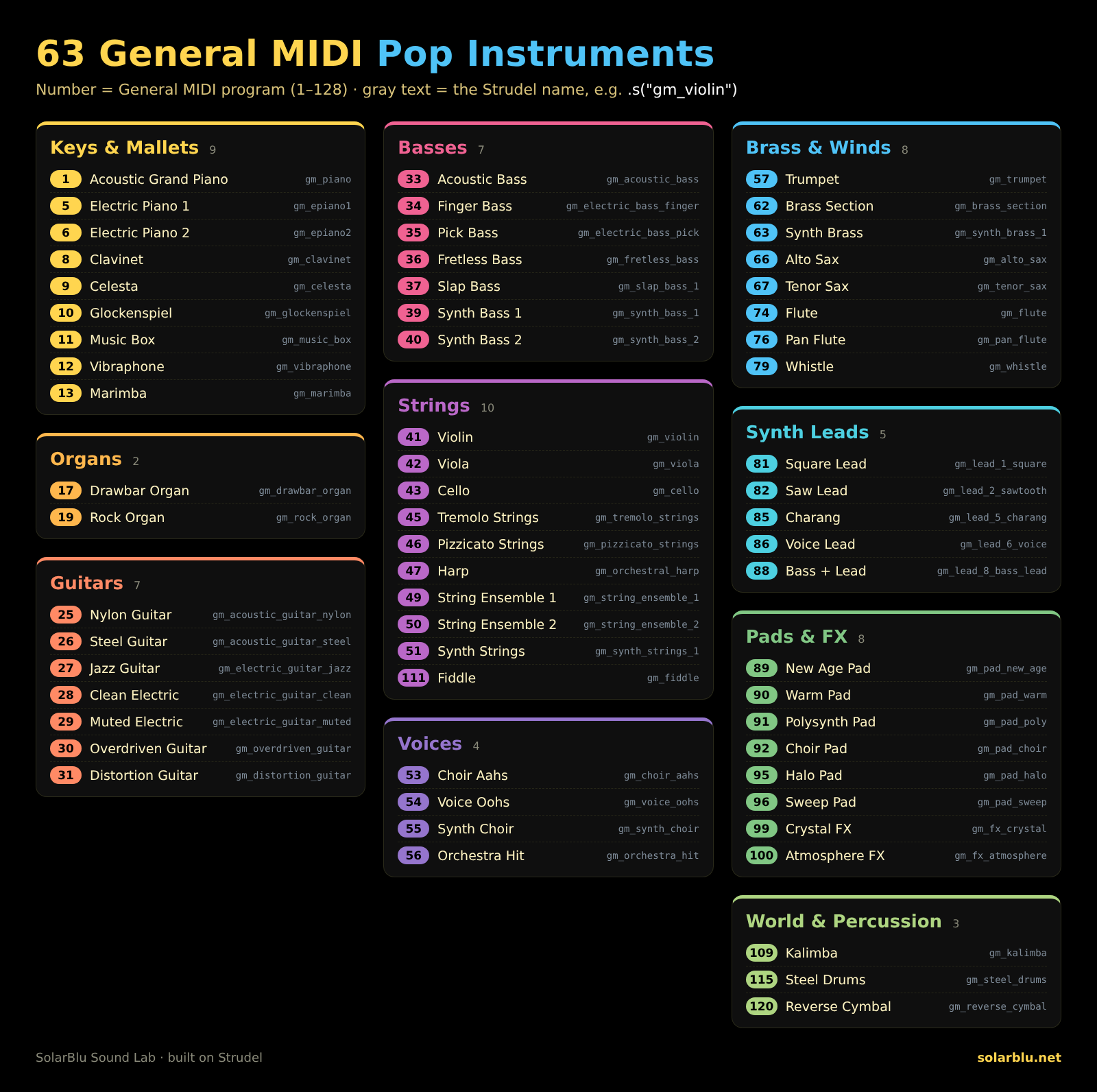
All 63 General MIDI pop instruments in Sound Lab. The number is the standard GM program number, and the gray name is what you type in Strudel, like .s("gm_violin").
.s("gm_violin").- 16 built-in synths, including the detuned supersaw
We fetch each library’s JSON index ourselves before handing it to Strudel. That gives us the instrument list for the browser panel, and a fallback: if GitHub is blocked, we retry through the jsDelivr CDN and rewrite each file’s base URL to the mirror. If everything fails, the synths still work and the status bar names the libraries that didn’t load, so you don’t just see “Failed to fetch.”
Bug #1: Stop didn’t stop
The first real bug: pressing Stop did nothing, and the loop kept playing. We tested it in headless Chrome and counted audio nodes starting after Stop. They kept climbing.
Digging into the bundle showed that hush() in this version calls stop() on a different scheduler object than the one actually playing. The live one, repl.scheduler, still reported started: true. The fix was to keep a reference to the REPL that initStrudel() returns and stop its scheduler directly:
const repl = await initStrudel({ /* ... */ });

function stop() {
  repl.scheduler.stop();   // the scheduler that's actually playing
  hush();                  // belt and braces
}
A real violin, borrowed from the soundfont package
I wanted a subtle violin alternating C and D under the pop templates. None of the sample libraries had one. Strudel’s full website uses General MIDI soundfonts for instruments like gm_violin, but that package isn’t in the browser bundle.
Loading the package separately would create a second copy of the audio engine, and its sounds would register in the wrong place. So we adapted the soundfont loader (about 60 lines, AGPL-licensed like Strudel itself) to call the bundle’s own registerSound, getAudioContext and envelope helpers. Each instrument downloads on first use, gets decoded into an AudioBuffer, and is pitch-shifted to the note being played.
Saving to a real folder
The first version saved to localStorage, which meant “saved” songs existed only inside the browser. That got old fast. Now every save goes into a sethbeats folder on disk through the File System Access API:
showDirectoryPicker()asks for the folder once.- The folder handle is stored in IndexedDB, so the app remembers it between visits.
- Songs save as
.strudel.jsfiles you can paste straight into strudel.cc. Single sounds save as.sound.json. - A
samples/subfolder holds your own recordings. Each file becomes a sound with amy_prefix, and each subfolder becomes one sound with numbered variations.
The catch: this API is Chrome and Edge only. Firefox and Safari fall back to plain downloads.
Exporting to a DAW: WAV, MP3, MIDI and stems
Audio. To record losslessly, we patch AudioNode.prototype.connect. Anything that connects to the speakers also connects to a hidden bus feeding a ScriptProcessorNode, which copies the raw samples. Those get written as 16-bit stereo WAV, or encoded to 256 kbps MP3 with lamejs.
Getting bar 1 to land exactly at the start of the file took two tricks:
- A half-second lead-in. Starting the pattern immediately sometimes dropped the very first downbeat because the scheduler’s first tick ran late. Shifting the pattern with
.late()fixed it. - Trimming from the audio itself. We query the pattern for its first note, find the first non-silent sample in the recording, and cut so that note lands where it belongs. We also filter out events past the last bar, so the next bar’s kick doesn’t leak into the reverb tail.
In testing, kicks and claps landed within about 3 ms of the grid in WAV files. MP3 adds roughly 25 ms of encoder padding at the start, so WAV is the right choice for anything you want to loop.
MIDI. Strudel patterns can be queried for every note in a time span, which makes MIDI export straightforward. Each $: track is evaluated on its own, its events are converted to note-on and note-off pairs, and they’re written into a standard type-1 MIDI file with a tempo track. Drum names like bd, sd and hh map to General MIDI drum notes 36, 38 and 42 on channel 10.
Stems. With one checkbox, each track is recorded separately, one file per instrument, all aligned to bar 1.
Live MIDI into GarageBand
The coolest part: Strudel can be the player while another app makes the sound. Using the Web MIDI API, Sound Lab sends notes through the Mac’s built-in IAC Driver (a virtual MIDI cable you switch on in Audio MIDI Setup). GarageBand picks them up like a keyboard. On Windows, the free loopMIDI does the same job.
We replaced Pattern.prototype.midi with our own version built on Strudel’s onTrigger() hook. A “Play through MIDI” switch then adds it to every track automatically.

Bug #2: the Test note button worked, but patterns sent nothing. We first sent each note with a timestamp slightly in the future so it would land exactly on the beat. That didn’t work in Firefox, where I was testing. Switching to Chrome, and sending each note at the moment it plays with setTimeout (the same way the Test note does), fixed it. We also added a live MIDI monitor, so you can always see whether notes are actually leaving the browser.
The GarageBand wall: we added a channel map: lead on 1, bass on 2, piano on 3, drums on 10. Then we learned that GarageBand doesn’t let you assign MIDI channels to tracks. It listens to all 16 channels and plays everything on the selected track. The workarounds:
- Record one part at a time.
- Load a multitimbral plugin like SampleTank 4 on one track and give each part its own channel.
- Use Logic Pro, where per-track channels work.
- Skip live MIDI and drag the exported MIDI or WAV stems into the project.
What I learned
- Test in a real browser early. Headless tests caught the Stop bug and the timing drift, but only real Chrome on a real Mac showed the Firefox MIDI problem.
- Pin your CDN versions. A one-line script tag is convenient, but you want to know exactly which version you’re debugging.
- Browsers are pickier than they look. MIDI, folder access and audio worklets all need a secure context.
localhostcounts. A plain-HTTP LAN address doesn’t. - The sounds aren’t unique; the choices are. Everyone has the 909 and the Amen break. What makes a track yours is the patterns, the mix, and your own samples in that
samples/folder.
Try Strudel yourself
You don’t need my dashboard to start. Go to strudel.cc, paste the acid pattern from the top of this post, and press Ctrl+Enter. If you build something cool, send it my way. I might play it on stream.
Need a custom web app, a WordPress build or a network that just works? SolarBlu.net · seth@solarblu.net · 312-869-4206
