Author name: solarbluseth

Custom PHP Development

obs vertical streaming setup and updates

STREAMING EXPERIMENT

Going Vertical: What Happened When I Streamed for Phones and Big Screens at the Same Time

The setup, the bugs, the numbers, and what I’m changing next. 📱🖥️

1. The Experiment: Meeting Viewers Where They Watch

People don’t all watch the same way. Some are on a desktop or a TV with a wide screen, and a huge number are on their phone, held upright, scrolling. For years I streamed in one shape — widescreen — and asked phone viewers to turn their device sideways or squint.

So I tried something different: send two versions of the same stream at once. A horizontal 16:9 version for big screens, and a vertical 9:16 version built for phones. The goal was simple: get more viewers by giving each of them their preferred screen.

There was a second reason too. Both YouTube and Twitch now show vertical live streams in their mobile, swipe-style feeds. On YouTube, a vertical stream can appear right in the Shorts feed, in front of people who have never heard of you. A widescreen-only stream isn’t eligible for that at all.

2. The Setup

Here’s what I’m running. If you stream with OBS, you can copy this almost exactly.

🔧 The tools

  • OBS Studio as the main broadcaster.
  • Aitum Vertical (free OBS plugin). It adds a second, vertical canvas with its own scenes, its own sources, and its own stream output.
  • Custom HTML overlays I built myself, loaded as OBS Browser sources (more on those below).

📐 The vertical layout

A phone screen isn’t just a narrow TV. TikTok and YouTube draw their own buttons and chat over the top and bottom of your stream, so the layout has to dodge them:

  • Top (~10–15%) — covered by your profile name and LIVE badge.
  • Bottom (~25–30%) — covered by scrolling comments and gifts.
  • Right edge — covered by the like, share, and gift buttons.

So my vertical canvas (1080×1920) puts the cam near the top (slightly inset so the profile badge doesn’t sit on my face), gameplay or the main action in the middle (the only area that’s reliably clear), and the logo at the bottom, where it’s fine if chat covers it. For karaoke streams, where I’m the content, the cam moves to the middle and gets bigger.

📶 Bitrate

The plugin suggested 6000 kbps for vertical, which sounds like a lot. It’s reasonable for 1080×1920, but remember the vertical stream runs alongside your main stream. The rule I use:

Horizontal bitrate + vertical bitrate should stay under about 75% of your upload speed. If you’re short, drop vertical to 1080×1920 at 30fps and 3500–4000 kbps, or 720×1280 at around 3000. It still looks sharp on a phone.

▶️ YouTube: two stream keys

YouTube can actually build a vertical version for you automatically — it’s on by default and center-crops your widescreen stream. You can switch it to Fit to phone width or Stacked under Live Control Room → Manage → Edit layout. But a center crop chops off anything in the corners, like a facecam. I wanted full control, so I send my own vertical feed:

  1. In YouTube Studio → Live Control Room → Stream, change the vertical preview dropdown from Auto to Encoder.
  2. Pick a second stream key for the vertical feed — it must be different from your horizontal key.
  3. In the Aitum Vertical dock settings → Stream, use server rtmp://a.rtmp.youtube.com/live2 and that second key.

Viewers in the Shorts feed get the vertical version, everyone else gets horizontal, and both share the same live chat. One catch: you have to set this up before you go live — you can’t add the vertical format mid-stream.

🟣 Twitch: Dual Format

Twitch rolled out Dual Format streaming to everyone in June 2026, and it works differently from YouTube. It runs through Twitch’s Enhanced Broadcasting (OBS → Settings → Stream → Multitrack Streaming) together with the Aitum Vertical plugin, and Twitch recommends OBS 32 or newer.

3. What Broke (and How I Fixed It)

This is the part I wish someone had written down before I started.

🐞 Bug: Twitch’s vertical output wouldn’t connect. YouTube worked fine, Twitch just wouldn’t.

✅ Fix: give every output a unique name. I had two outputs both named “Twitch.” The plugin couldn’t tell them apart, so the vertical one failed. Renaming them to “Twitch Main” and “Twitch Vertical” fixed it instantly. Strange bug — easy fix once you know.

🐞 Gotcha: Twitch Dual Format and a YouTube primary. Enhanced Broadcasting is tied to OBS’s main output, and only works when that main output is going to Twitch. My main output is YouTube.

✅ Options: make Twitch the main OBS output (with Enhanced Broadcasting) and send YouTube through extra outputs, or keep YouTube as main and send Twitch horizontal-only through a multistream output.

🐞 Gotcha: “Where’s the Backtrack setting?” Older guides mention a “Backtrack Always On” checkbox. It’s gone.

✅ Fix: Backtrack (Aitum’s instant replay for the vertical canvas — it saves the last 30–60 seconds as a ready-to-post vertical clip) now has a start/stop button right on the Vertical dock. Settings live under the dock’s gear icon → General → Backtrack. It’s optional — the vertical stream works without it, and some people have had vertical streams drop with it running, so get the stream stable first.

🐞 Gotcha: TikTok LIVE Studio doesn’t have “Browser” sources.

✅ Fix: use a Link source with a real web URL (I host my overlay HTML files on my own site). LIVE Studio’s built-in browser is older, can stutter, sometimes loads a Link source at 0×0, and has no refresh button. If that happens, build the scene in OBS, start OBS Virtual Camera, and add it to LIVE Studio as a Camera source instead.

4. The Results

I ran a test SETHaoke stream with the vertical feed going to YouTube. Here’s what the analytics showed:

506views in 48 hours
97.2%from the vertical live feed
97.7%watched on mobile
22peak concurrent viewers

For context: across the previous 90 days, all of my live streams combined got 837 views. One vertical stream pulled more than half of that in two days — and nearly every one of those views came from a feed that a widescreen-only stream can’t even appear in.

Reach: huge win. But then there’s the other half of the story…

Metric Result What it means
Total watch time 0.3 hours About 2 seconds per view
Average concurrent viewers 1 People saw it and swiped on
Chat messages 3 Almost nobody stopped to talk

So the vertical feed is putting me in front of far more people than ever — but they’re deciding in a second or two, and most of them are scrolling past.

5. What I Learned

  • The vertical feed is a discovery engine, not a living room. It’s the same thing I’ve seen on TikTok LIVE: tons of people pass through, few stay. That’s normal for swipe feeds.
  • The first 2 seconds are everything. In a feed full of faces, a small cam and a quiet moment get skipped. Dead air between songs is exactly when viewers leave.
  • Most viewers will never type. I’ve said hello a million times to silent rooms. People scrolling one-thumbed in bed are listening, not chatting — so the stream has to be entertaining with zero chat, like a radio host who assumes the room is full.
  • Ask for tiny actions, not conversations. “Tap the screen” or “drop a 💙” takes half a second. “Say hi” asks someone to start a conversation. And on TikTok, “send a heart” can sound like asking for a paid gift — taps are the free version.
  • People scroll with the sound off. If the premise isn’t written on screen, a lot of viewers never find out what the stream is.

6. Where We Go From Here

The fix for the 2-second problem is to make the vertical feed explain itself instantly and give viewers something to do. So I built a set of custom HTML overlays — each one is a single file loaded as an OBS Browser source, styled to match my channel:

Overlay What it does
🌌 Animated background Drifting glow, a moving grid, and floating particles to fill empty space behind the cam and gameplay.
🎤 SETHaoke “Now Singing” banner LIVE badge, the current song and artist (editable live), and a ticker: song requests, “just swiped in? type 💙,” chat picks the next song.
👽 Sims community banner “Join our community — we’ll create a Sim for YOU!” plus a “Newest resident” shout-out for the viewer whose Sim just moved in.
👆 TikTok tap banner A big animated “TAP THE SCREEN” with floating hearts and free-action prompts: tap, follow, share.
⏸️ BRB screen Full-screen “Be Right Back” with an optional countdown and rotating chat prompts, so breaks don’t empty the room. Works on both canvases.

Alongside the overlays, the plan for the next streams:

  • Bigger face, constant motion on the vertical canvas.
  • No dead air — fill song transitions with talk, a piano riff, or a sound effect.
  • Talk to newcomers the way a radio host would, and recap what’s happening every few minutes for people just arriving.
  • Clip the best moments into Shorts with Backtrack, each one linking back to the full stream.

📊 What I’ll measure in Part 2

YouTube publishes vertical-only stats about 24 hours after a stream. I’m watching two numbers:

  1. Average concurrent viewers — moving from 1 to 3–5 would be real progress.
  2. Watch time per view — moving from ~2 seconds to 10–15 seconds means the hook is working.

If reach stays where it is and those two numbers climb, the swipe-throughs start turning into actual viewers. I’ll post the before-and-after in Part 2.

🎤 Come Be Part of the Experiment

Catch SETHaoke and the Sims 4 series live — on your phone or your big screen, whichever you like. Drop a song request, give us a Sim name and a trait, or just tap the screen to say hi. 💙👽🎂

@SolarBluSeth on YouTube, Twitch, Kick, TikTok, and Instagram.

Custom PHP Development

Seth Is Your Superhero ;$299 One-Page Website

Spooktacular Website Deal โ€“ Seth Is Your Superhero โ€“ $299 One-Page Website, October Only

๐Ÿ‘ป Bury Your Old Website This Halloween!

Is your website stuck in the past, hard to use on a phone, or looking just like everyone else’s? This October, Seth is swooping in to rescue your brand with a beautiful, mobile-friendly website, built to bring you more interested clients.

Reg. $450 $299

๐Ÿฆ‡ One-Page Website ยท October Only ๐Ÿฆ‡

Everything You Need, No Tricks

  • Custom one-page design built around your brand, logo, and colors
  • Fully mobile-friendly, so it looks great on phones, tablets, and desktops
  • Lead/contact form that sends inquiries straight to your inbox
  • Click-to-call and click-to-email buttons for on-the-go clients
  • Basic on-page SEO setup so search engines know who you are and where you work
  • SSL security (the padlock) and connection to your domain
  • Built on WordPress, so it can grow into a bigger site whenever you’re ready

Real Estate & Insurance Agents: Your Company Page Isn’t Enough

The page your company gave you checks a box, but it isn’t really working for you.

๐Ÿ•ธ It looks like everyone else’s Same template, same layout, same stock photos as hundreds of other agents. Nothing shows clients why they should choose you.
๐Ÿ”’ You can’t control it You can’t change the design, add the pages you want, or speak to the clients you want to reach.
๐Ÿ” It’s hard to stand out in search Search engines see a pile of near-identical agent pages. Your own site, written around your name, town, and specialty, gives you a real chance to be found.
๐Ÿš It isn’t yours to keep Change companies and that page stays behind. Your own website and domain go wherever your career goes.

Not an agent? This deal is perfect for any small business that needs a fresh, professional online presence: salons, contractors, restaurants, coaches, creators, and more.

๐Ÿฆธ Why Seth Is Your Website Superhero

I’ve been building websites since 1996, more than 6,000 of them. You’re not getting a cookie-cutter template from someone who’ll disappear next month. You’re getting a site built right, by someone who’ll still be here to support it.

Frightfully Frequent Questions

Is the $299 price really only for October?Yes! The Spooktacular price is available for orders placed by October 31. After that, one-page sites return to regular pricing.
Is hosting included?Hosting is included in the $299 build. Reliable managed hosting and maintenance plans, including updates, backups, and security, are available separately so your site stays fast and protected.
Can I add more pages later?Absolutely. Your site is built on WordPress, so we can add pages, a blog, listings, or anything else as your business grows.
I’m a captive insurance agent. Am I allowed to have my own site?Some companies have rules about personal websites. Check with your company first, and I’ll build your site with the disclaimers and license info your company or state requires.
How long does it take?Most one-page sites are ready to launch within a couple of weeks once I have your content, logo, and photos.

๐ŸŽƒ Don’t Let This Deal Vanish!

Get your brand-new, mobile-friendly website for just $299. Offer ends October 31.

One-page website build.  Offer valid for orders placed by October 31, 2026.

Custom PHP Development

Our Do Not Call Promise

Our Do Not Call Promise

If your number is on the Do Not Call list, SolarBlu.net will not call you. No exceptions, no loopholes, no arguing about whether it’s a business line.

We make outbound calls to local businesses about websites, hosting and internet services. We know how it feels to get a call you didn’t ask for, so here’s exactly how we handle it.

What we do before we ever dial

Every month, as federal law requires, we download the latest National Do Not Call Registry for every area code we call and load it into our own system. That fresh list then gets passed down the line, and every calling list we use is checked against it. Nothing in our pipeline skips that step.

Any number that shows up on the registry comes off our lists that same day. It doesn’t get set aside for later. It gets deleted.

On the list? We don’t call. Period.

Plenty of small business owners list their personal cell on their Facebook page or Google listing. Lots of those cells were put on the Do Not Call list years ago.

Some companies will tell you that a business listing makes it fair game. We don’t play that game. If the number is on the list, we treat it as off-limits, whether it’s a personal line, a business line, or both.

That way, if you ever get a call from us, we can say with certainty that your number was not on the Do Not Call list when we dialed it.

Ask us to stop and we stop

You don’t have to be on any registry to stop hearing from us. Tell whoever calls “please don’t call me again,” and that’s the end of it.

We’ll take you right off the list and move on with our lives. No pushback, no “just one more minute,” and no follow-up call next month.

A tip for business owners: get a business line

If your personal cell is the number on your business listing, you’re mixing two lives on one phone. Customers call it at 9pm on a Sunday, and legitimate companies that follow the rules may never call you at all.

A separate business number fixes both. A free Google Voice number or a cheap second line that rings your cell keeps your personal number private. It also lets you set business hours, and it looks more professional on your website.

We practice what we preach. As a technology company, we answer hosting support calls around the clock, and those calls still come in on a business line, not anyone’s personal cell.

The bottom line

We’d rather lose a lead than make a call we shouldn’t. If you’re on the list, we won’t call. If you ask us to stop, we stop. Questions about how we handle calls? Reach out at solarblu.net and we’ll tell you straight.

Custom PHP Development

Header Glow-Up, Mobile Fixes & a Little Rocket

Dev Log ยท Advanced Themer 13

Header Glow-Up, Mobile Fixes & a Little Rocket

Today was a big one for Advanced Themer 13. We rebuilt how the header is put together so it can carry a real logo, gave the phone number a proper home, got everything behaving on phones, and added a floating admin launcher for editing on the fly. Oh, and we upgraded to the newest WordPress the same afternoon. No pressure.

October 6, 2026  ยท  WordPress 7.1.2  ยท  Astra 4.13  ยท  SolarBluSeth

 
+1
Header logo slot
 
Fixed
Phone placement
 
3 bugs
Squashed on mobile
 
7 links
In the Advt Admin menu
 
7.1.2
WordPress, still compatible

A real logo, right before the title

Header Options now has a Logo field with a Media Library picker and a height slider, plus a live preview at the top of the settings page. Rather than squeezing an extra <img> into the markup, we feed the logo into the theme's own logo slot. That way Astra handles placement, it stays accessible, and it doesn't break on the next theme update.

The trick is that WordPress lets you filter any theme mod on the way out. Here's the general pattern (simplified):

// Point the theme's custom_logo at an image chosen in our own settings.
add_filter( 'theme_mod_custom_logo', function ( $value ) {
    $url = get_option( 'my_plugin_logo' );
    return $url ? attachment_url_to_postid( $url ) : $value;
} );

Docs: theme_mod_{$name} ยท attachment_url_to_postid() ยท get_custom_logo


Lesson of the day: "Why won't it save?!"

The first version of the logo field showed up fine but quietly refused to save. The culprit: the new option was registered in an older copy of a settings file that the plugin doesn't actually load anymore. When you post to options.php, WordPress only saves options it knows about through register_setting(). Anything else is dropped without an error. Moral: when a field won't stick, check where it's registered, not just whether it is.

The phone number found its seat

The phone number used to live in a separate row under the menu, where it ended up stranded with odd spacing. Funny thing: adding it to the menu by hand always looked right. So we did the same thing in code. The plugin now adds the phone (and the CTA button) to the end of the primary menu, so it sits in its own slot at the far right with a subtle divider.

add_filter( 'wp_nav_menu_items', function ( $items, $args ) {
    if ( 'primary' !== $args->theme_location ) return $items;
    return $items . '<li class="menu-item my-phone">โ€ฆ</li>';
}, 10, 2 );

Docs: wp_nav_menu_items. It still pulls from the Header Options settings, so editing the number updates desktop and mobile at once.

Mobile: three gremlins, three fixes


The invisible hamburger

CSS

The menu toggle was there the whole time, just drawn in the theme's default blue on top of a dark banner. It now uses the header text and hover colors, so it shows up on any banner.


The "every page ever" menu

MenusFallback

Astra's mobile header uses its own menu location. With nothing assigned there, WordPress fell back to listing every single page on the site, test pages included. Now, if the mobile slot is empty, it mirrors the primary menu automatically, CTA and phone included.


Client Logo

Responsive

A big logo plus a 34px title on a 375px screen meant the site name wrapped one syllable per line. On smaller screens the logo and title now scale down so they fit neatly beside the toggle.


Debugging tip: if a theme seems to ignore your wp_nav_menu_args filter, it may be skipping wp_nav_menu() entirely and calling the fallback itself when has_nav_menu() comes back false. A quick temporary log of the arguments tells you which path you're on. That's what pointed us to the fix.

Meet "Advt Admin"

New this round is a little rocket button pinned to the bottom-right corner of the front end. Tap it and a menu pops up with everything we reach for most:


Edit in place

  • Edit this page, with the page ID shown right in the label
  • Edit with Composer (Visual Composer / WPBakery)
  • Edit with Elementor


Create something new

  • Add new media
  • Add new page
  • Add new post


Polite by design

  • Only logged-in editors ever see it
  • Each link checks current_user_can()
  • Hides inside page-builder previews
  • Everything opens in a new tab, and Esc closes the menu

It hooks into wp_footer, so it works with any theme, not just Astra. It also politely moves the theme's scroll-to-top arrow out of its way.

Upgrade day: WordPress 7.1.2

We also moved the dev site to the latest WordPress today, mid-sprint, because why not. Advanced Themer 13 loaded cleanly, settings saved, and the header, menus and admin launcher all behaved. We'll keep watching it over the next few days, but so far so good.


WordPress 7.1.2Updated today ยท running clean


Astra 4.13Header builder ยท desktop + mobile


Advanced Themer 13Compatible ยท no errors


Keeping an eye on itReal-world testing continues

Today at a glance

Step 1

Logo field: Media Library picker, height control, live preview, wired into the theme's logo slot.

Step 2

Save bug: tracked down to an option registered in a file that isn't loaded. Moved it to the right place.

Step 3

Phone number: moved from its own row into the menu, in its own slot on the right.

Step 4

Full-width containers: the header and content can now use the whole width of the screen.

Step 5

Mobile: a visible toggle, the real menu, and a title that fits.

Step 6

Advt Admin: the rocket launcher, with Composer and Elementor shortcuts.

Step 7

WordPress 7.1.2: upgraded, tested, still compatible.


More soon. Advanced Themer keeps getting better one dev log at a time.
Built with , WordPress hooks, and stubbornness by SolarBluSeth.
Custom PHP Development

Building SETHaoke26 with Claude AI

๐Ÿš€ Project Overview

SETHaoke26 is a comprehensive, production-grade karaoke management system built with Claude AI to power professional streaming sessions. Featuring a 73,000+ song library with intelligent queue management, MIDI backing tracks, sound effects, and seamless OBS streaming integration, this system transforms how karaoke is managed and performed live.

โšก Built with Claude AI
This entire system was architected and implemented using Claude AI, reducing development time and creating a clean, maintainable codebase that blends PHP backend power with modern frontend interactivity.
73,039
Total Songs in Library
13,777
Artists Catalogued
3,663
Lines of Production Code

๐Ÿ›  Technology Stack

SETHaoke26 leverages a modern tech stack optimized for performance and reliability:

PHP 7.4+
MySQL
jQuery
JSON API
HTML5
CSS3
JavaScript
OBS Bridge

Architecture Highlights

  • PDO MySQL โ€” Type-safe parameterized queries preventing SQL injection
  • AJAX Layer โ€” Real-time interactions (delete, queue, mark played)
  • RESTful API โ€” JSON responses for all data operations
  • File Streaming โ€” Direct MP3/CDG serving for playback
  • CDG.js โ€” Karaoke graphics synchronization
  • OBS Integration โ€” HTML overlays for streaming displays

๐Ÿ“Š Core Features

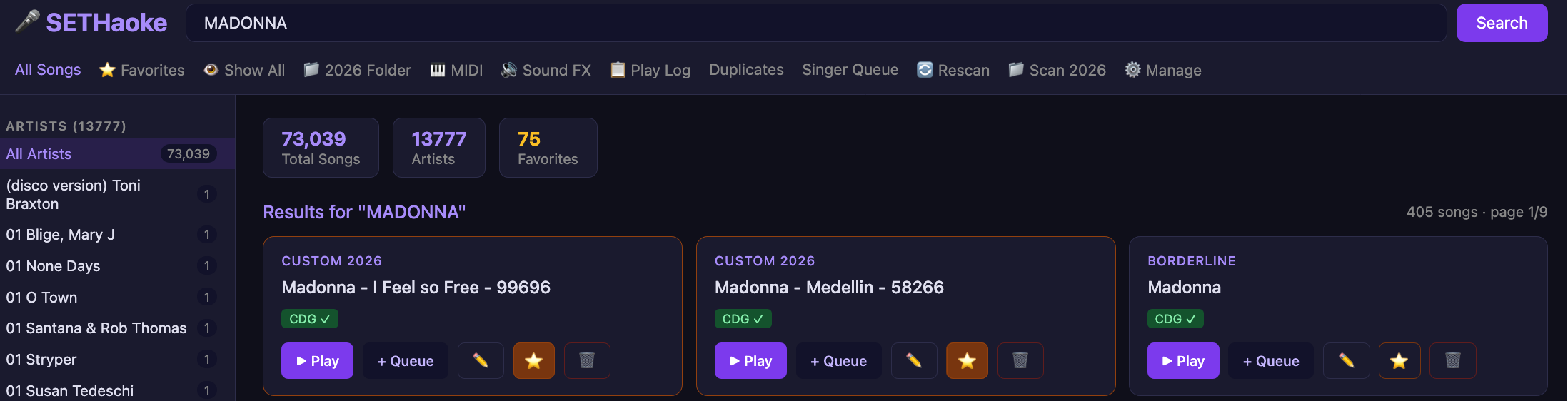
1. Song Library Interface

Browse and manage your entire collection with powerful search, filtering by artist, and quick play/queue actions:

SETHaoke Song Library Interface
Main Song Library: 73,039 songs with instant search, favorites, CDG indicators, and queue management

2. Singer Queue Management

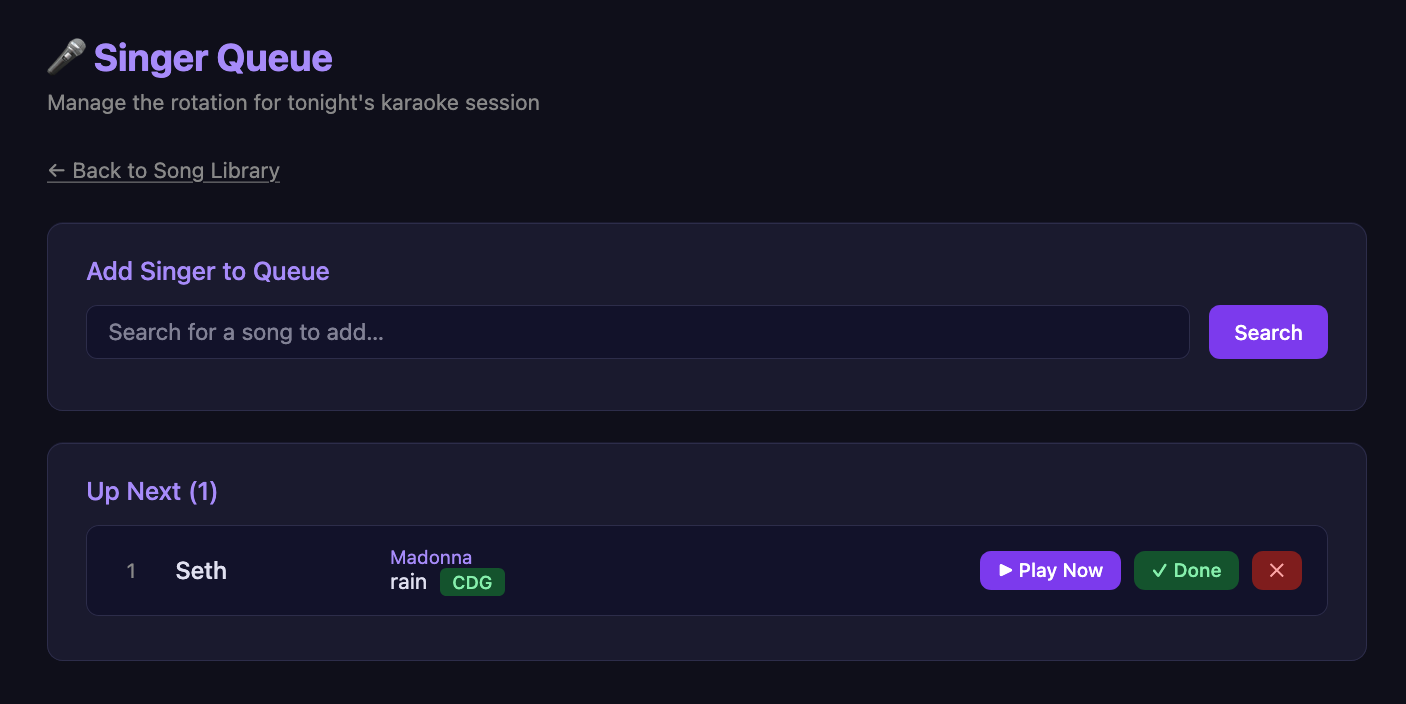
Real-time queue management for coordinating tonight's karaoke rotation. Add singers, reorder queue, mark songs complete, and sync to OBS overlay:

SETHaoke Singer Queue
Singer Queue: Manage rotation, track CDG status, and coordinate with streaming overlay

3. MIDI File Management

Direct MIDI file support for backing tracks and musical arrangements. Scan, organize, and play MIDI files seamlessly integrated with the main library.

4. Sound Effects Library

Categorized sound effects for transitions, alerts, and streaming enhancement. Quick-access buttons for live show operations.

5. Play Logging & Analytics

Track every song played with CSV logging (play_log.csv). Monitor play counts, artist popularity, and build performance analytics.

6. OBS Streaming Integration

Custom HTML overlays for OBS Studio including multi-platform alert system and audience counters for real-time engagement tracking.

๐Ÿ’ป Technical Deep Dive

Database Schema

Clean, normalized MySQL structure with dynamic column management:

-- Songs table with flexible attributes CREATE TABLE songs ( id INT PRIMARY KEY AUTO_INCREMENT, artist VARCHAR(255), title VARCHAR(255), mp3_path VARCHAR(500), cdg_path VARCHAR(500), source VARCHAR(100), favorite TINYINT DEFAULT 0, active TINYINT DEFAULT 1, play_count INT DEFAULT 0 );

API Architecture (api.php)

RESTful API handling song deletion, artist removal, play tracking, and queue management:

// AJAX API endpoint for real-time interactions $action = $_GET['action'] ?? ''; if ($action === 'delete_song') { // Remove song and linked CDG/MP3 files $pdo->prepare("DELETE FROM songs WHERE id=?")->execute([$id]); } if ($action === 'played') { // Increment play count, log to CSV $pdo->prepare("UPDATE songs SET play_count=play_count+1")->execute([$id]); // Write to play_log.csv for analytics }

Frontend Interactivity (jQuery)

Smooth user experience with jQuery-powered AJAX calls, no page reloads:

// jQuery AJAX for delete without refresh $('.delete-btn').click(function() { var songId = $(this).data('id'); $.ajax({ url: 'api.php?action=delete_song&id=' + songId, type: 'GET', success: function() { // Remove from DOM location.reload(); // Soft refresh } }); });

CDG Graphics (cdg.js)

JavaScript implementation for karaoke graphics synchronization, displaying lyrics and backgrounds in real-time with audio sync.

OBS Bridge

HTML overlays (obs_multi_alert_system.html, obs_overlay.html) embedded directly in OBS as browser sources for seamless streaming integration.

๐Ÿ“ˆ Performance Metrics

25+
PHP Module Files
315
Lines in api.php
424
Lines in index.php

The system is optimized for speed with database indexing on artist/title, AJAX pagination limiting results to 50 items per page, and file system caching for CDG graphics.

๐ŸŽฏ Why Claude AI?

Claude AI made this project possible. Instead of months of solo development, we leveraged Claude's understanding of database architecture, API design, and JavaScript interactivity to build a cohesive system in days. The result is clean, maintainable code that blends:

  • Robust PHP/MySQL backend with proper parameterization
  • Modern jQuery frontend with real-time AJAX
  • RESTful JSON API design
  • Streaming platform integration (OBS)
  • Production-ready error handling and logging

Claude understood the full context of karaoke system requirements and produced code that handles edge cases, manages file systems safely, and provides an intuitive UX for live performance scenarios.

๐Ÿ“บ OBS Streaming Overlay

One of the most powerful features of SETHaoke26 is its seamless OBS Studio integration. The system includes a purpose-built HTML overlay that displays real-time information directly on your stream, keeping your audience engaged and informed.

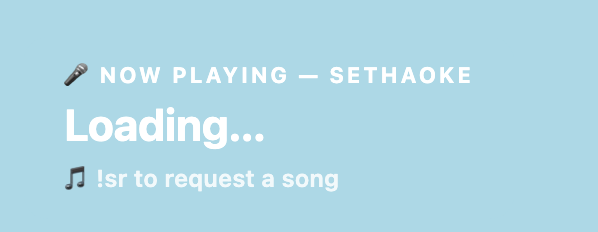
The Now Playing Overlay

A clean, professional browser source overlay that displays the current song status. The overlay features:

  • Live Status Display โ€” Shows "Now Playing", "Loading", or current song info
  • Artist & Title โ€” Full song information with singer attribution
  • Chat Commands โ€” Displays !sr command for song requests
  • Responsive Design โ€” Adapts to any stream resolution (720p, 1080p, 4K)
  • Beautiful Gradient UI โ€” Professional light-blue aesthetic with smooth animations
SETHaoke OBS Now Playing Overlay
OBS Overlay: "Now Playing โ€” SETHaoke" with song request command (!sr) visible to chat

Integration with OBS Studio

Setting up the overlay in OBS is straightforward:

1. Open OBS Studio 2. Click "+" in Sources โ†’ Browser 3. Point to: /sethaoke26/obs_overlay.html 4. Set Resolution: 1920x1080 (or your stream size) 5. Enable Browser source refresh 6. Position overlay on your scene (corner recommended)

Real-Time Song Updates

The overlay includes JavaScript that can connect to your sethaoke26 backend to display live data:

// Fetch current track from your system fetch('/sethaoke26/logs/current_track.json') .then(r => r.json()) .then(data => { // Update overlay with: // - Artist name // - Song title // - Singer/performer name // - CDG status indicator });

Multi-Platform Streaming

The OBS overlay system also includes the obs_multi_alert_system.html file, a comprehensive alert system that:

  • Multi-Platform Support โ€” Twitch, Kick, YouTube, and custom webhooks
  • Real-Time Notifications โ€” Follows, subscriptions, donations, raids
  • Customizable Alerts โ€” Sound effects, animations, and text overlays
  • Viewer Counter โ€” Live audience size display
  • Engagement Tracking โ€” Monitor chat activity and metrics

Why This Matters for Karaoke

For live karaoke streaming, the overlay serves critical functions:

  • Clarity โ€” Viewers instantly know whose turn it is and what's playing
  • Engagement โ€” The !sr command drives audience participation and song requests
  • Professionalism โ€” Branded overlays elevate production value
  • Analytics โ€” Track which songs get requested vs. performed
  • Accessibility โ€” Closed captions and text-based information for all viewers

HTML & CSS Architecture

The overlay is built with clean, lightweight HTML and CSS for optimal performance:

.overlay-container { background: linear-gradient(135deg, #8ec5fc 0%, #b8d7f8 100%); display: flex; align-items: center; justify-content: center; } .now-playing-box { background: linear-gradient(135deg, #7ab8f5 0%, #9fd1ff 100%); padding: 40px 50px; box-shadow: 0 15px 40px rgba(0, 0, 0, 0.2); border-radius: 12px; } /* Smooth animations for state changes */ @keyframes pulse { 0%, 100% { opacity: 1; } 50% { opacity: 0.7; } } .loading { animation: pulse 1.5s ease-in-out infinite; }

Future Enhancements

The overlay system is designed to be extensible. Potential features include:

  • Leaderboard of most-sung artists
  • Countdown timer to next performance
  • Singer profile cards with photo/social handles
  • Integration with Discord bot for moderation
  • Custom animations and transitions

๐Ÿš€ What's Next?

SETHaoke26 is actively maintained and ready for streaming. Potential enhancements include:

  • Web-based remote queue management for audience requests
  • Discord bot integration for Twitch/Kick chat commands
  • Playlist scheduling and show templates
  • Advanced analytics dashboard
  • Mobile companion app for singers

SETHaoke26 โ€” Powering professional karaoke streams on Twitch, Kick, and beyond.

Built with Claude AI | Made by Seth @ SolarBlu.net

ยฉ 2026 SolarBlu Seth. All rights reserved.

SolarBlu
Scroll to Top