

A New Free Streamer Tool Is Here — And This Is Only Stage 1
A local HTML-based display system for Twitch, Kick, YouTube and OBS
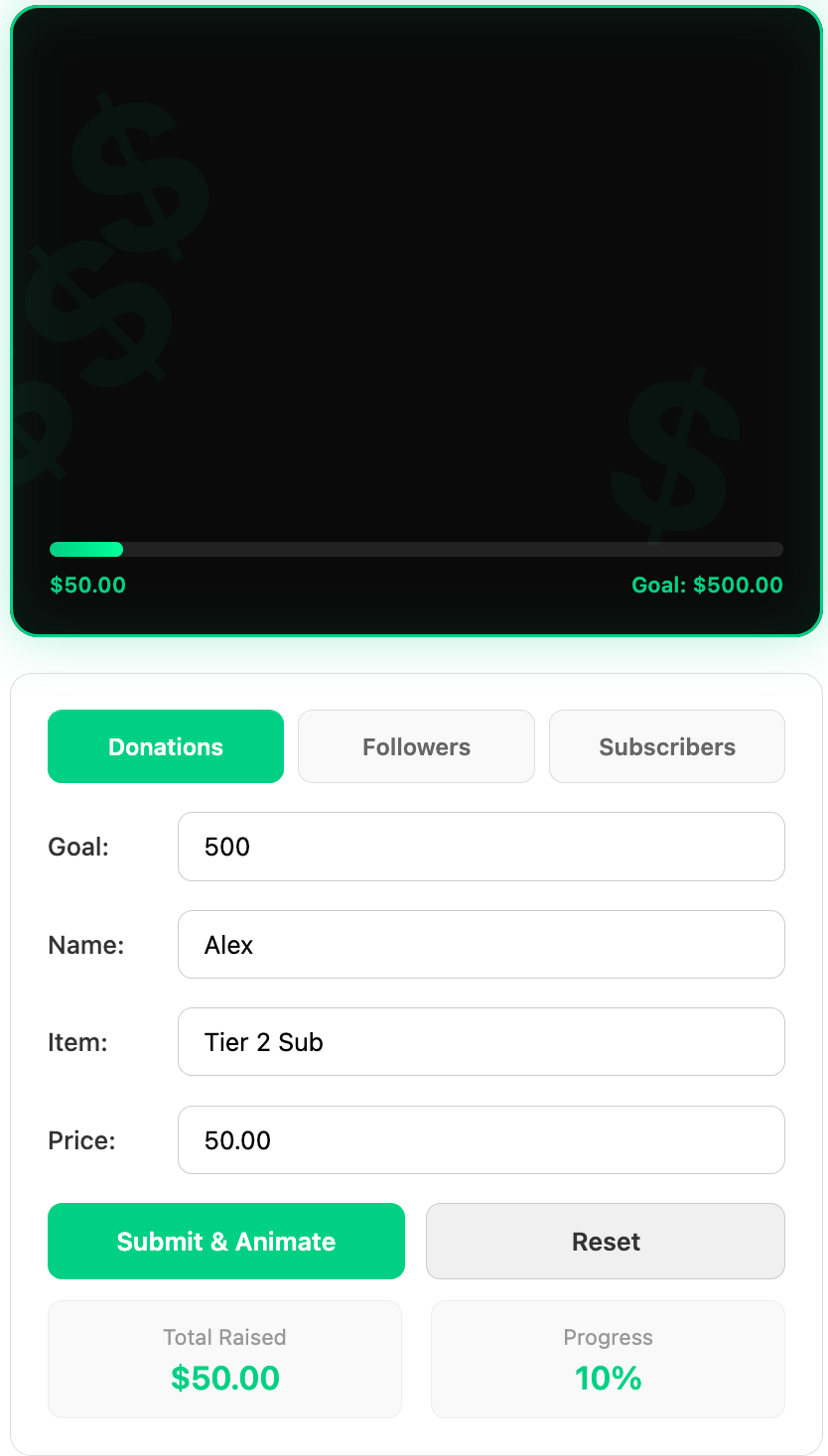
Something New Is Being Built
I've been working on a new idea for streamers: a lightweight display system that can run locally on your own computer and be used directly with OBS.
The first version is intentionally simple.
There is no complicated dashboard, no database, and no monthly subscription required to use the local version.
It's an HTML-based system designed to give streamers a way to create and control on-screen events without having to depend on another streaming service for every little thing.
This is Stage 1.
And Stage 1 is being made available as a free tool.
What Can It Do?
The current version already has several different event displays built into it.
💰 Donations
Set a donation goal, enter the donor's name, specify what the donation is for, enter the amount, and trigger the on-screen animation.
The display can also keep track of the total raised and progress toward the goal.
👥 Followers
The follower system is designed with multiple platforms in mind.
The current interface includes Twitch, Kick and YouTube, along with follower names, custom messages, platform counts and goals.
⭐ Subscribers
Subscriber events can be displayed using different subscription tiers, subscriber names and custom messages.
The system also keeps track of total subscriptions and the most recent tier.
Built With OBS In Mind
One of the goals of this project is to keep the setup as simple as possible.
The HTML can be stored locally on your computer and opened in a browser such as Firefox for testing.
From there, the display can be brought into OBS as a browser source.
The display is also designed with transparency and chroma-key workflows in mind.
That means you can place the event display over your stream and use OBS filters to remove the background when necessary.
OBS Tip
When you're using an OBS mask/filter, make sure you're applying the mask to the
display rectangle, rather than accidentally masking the control area.
The controls are there to configure and trigger the event; the rectangle is the part you want your viewers to see.
Why Make It Local?
There is something appealing about a streamer being able to download a tool and simply run it on their own computer.
You don't necessarily need another cloud dashboard just to display a follow, donation or subscriber event on your stream.
A simple local HTML application can handle the visual side of the job.
That also makes this first version a great place to experiment.
I can build the display system, test different animations and layouts, and let streamers see what works before moving into the next stage.
But This Is Only Stage 1
This is where the project gets much more interesting.
The free local version is the beginning—not the end.
The next stage of development is going to introduce a database and connected functionality.
Instead of everything existing only inside a local HTML page, the system can begin storing information and connecting the streamer to a larger platform.
Local Display
→
Connected Account
→
Database
→
Advanced Streamer Tools
Where Twitch Login Comes In
As this project moves beyond the local version, Twitch authentication will become an important part of the system.
The plan is for streamers to sign in with Twitch before downloading the tool.
The tool itself is still intended to be free at this stage, but requiring Twitch authentication gives the system a way to connect the streamer to their account as the project develops.
This will also make it possible to build toward features that simply aren't practical with a completely disconnected HTML file.
The Bigger Idea
What started as an HTML display is becoming something much bigger.
The long-term goal is to create tools that give streamers more control over their own communities, events and content while keeping the experience as straightforward as possible.
Twitch, Kick and YouTube are already being considered in the design of the display system. As the project develops, the goal is to connect those platforms to a common system rather than creating completely separate tools for every platform.
The local display is essentially the visual layer.
The database and connected services will eventually become the infrastructure behind it.
Why Release It Now?
Because I don't think everything needs to be finished before people get to see it.
This is an early look at something that is actively being developed.
The first stage gives streamers something useful to experiment with while also providing a foundation for the much larger system that comes next.
Stage 1 is about proving the idea.
Build it. Use it. Put it in OBS. See what works.
Then we'll build the next stage.
The Free Local Streamer Display
```
This is the beginning of the project.
More features, connected accounts and database-powered tools are coming as development continues.
Stage 1: Free. Local. Simple.
```
SolarBlueSeth — Building new tools for streamers.
Streamer Tools
Login with Twitch to get started
Sign in with your Twitch account to get access to the Broadcaster Tools.
Once you've logged in, you'll be able to access the streamer tools available to your account, including the latest display and broadcasting features.
What happens next?
Click Login with Twitch.
Your Broadcaster Tools will be available after you log in.
Twitch authentication is handled through Twitch. Your Twitch password is never entered on SolarBluSeth.
```