Author name: solarbluseth

Custom PHP Development

Privacy, Compliance, and Community Protection


Privacy, Compliance, and Community Protection

Last updated: July 25, 2026

The reality: I face harassment online. When I stream, post, or create content, there are people whose explicit goal is to harm me and disrupt my community. So I built infrastructure to stop rewarding that behavior—and I did it legally.

This article explains how GDPR, CCPA, and our implementation work together to protect both privacy and community.

🔒 Security First: Why This Matters Before Privacy

Before we talk privacy law, let's talk security. Harassment infrastructure—organized brigades, rotating IPs, coordinated attacks—requires serious defense. And here's the critical part: you cannot track and block harassment without thinking deeply about privacy and legal compliance.

The Core ProblemHarassers rotate IP addresses. They use VPNs, proxies, and throwaway accounts. A single IP block is useless—they'll just hit you from the next proxy. To actually stop them, you need to identify patterns of behavior and intent. But identifying patterns means collecting and analyzing data. And analyzing data is what GDPR and CCPA regulate heavily.

How We Actually Defend Against Harassment

Blocking by IP alone doesn't work. We use a multi-layered approach:

🔍

Behavioral Fingerprinting

Track patterns: request sequences, timing, device signatures, browser fingerprints, and access patterns. Same person, same behavior = block, even with new IP.

⏱️

Rate Limiting & Velocity Checks

Detect unnatural request patterns: accessing 100 pages in 2 seconds, login attempts from 50 IPs in an hour, rapid account creation. Real users don't do this.

🎯

Content Analysis

Scan messages, comments, and reported activity for harassment keywords and patterns. One bad message from a Twitch account? Logged, analyzed, decision made.

🚨

Threat Intelligence

Track known harassment networks, coordinated attack groups, and previously-blocked accounts. If a known harasser's info pops up, we catch it immediately.

What Data We Actually Use for Security

Security monitoring is separate from analytics. Here's what we track, why, and for how long:

Data Type Why We Track It Legal Basis
IP address Detect coordinated attacks, DDoS, brute force Legitimate interest (security)
Browser fingerprint Identify same person behind proxy/VPN Legitimate interest (security)
Twitch account + behavior Detect harassment patterns, coordinated campaigns Legitimate interest (community safety)
Request patterns/velocity Spot bot attacks, automated harassment Legitimate interest (security)
Reported harassment content Document abusive behavior for blocking decision Legitimate interest (community safety)
Why This Is Legal Under GDPRLegitimate interest is a valid legal basis for processing personal data. Security is a classic legitimate interest. You're not required to ask permission to defend your infrastructure from attack. You ARE required to:
✓ Be transparent (which we are)
✓ Minimize data collection (we do)
✓ Have proportional retention (30 days for logs is reasonable)
✓ Not abuse it (we're not selling this data or using it for marketing)

What Happens When We Block You

  1. Detection: Behavior pattern matches known harassment signature
  2. Review: Manual check of evidence (messages, velocity, reports)
  3. Decision: Block or monitor
  4. Implementation: IP block, account block, fingerprint block
  5. Duration: Permanent unless you appeal (and we'll reconsider if evidence changes)
  6. Data handling: Blocking evidence retained for legal defense; other data deleted per schedule

---

🇪🇺 GDPR: The European Privacy Standard

GDPR (General Data Protection Regulation) is EU law governing personal data. It applies to anyone processing data of EU residents, regardless of where you live.

What GDPR Requires

Legal BasisBefore collecting data, you need one of six legal reasons. We use:
Consent: For analytics (Google Tag Manager)
Legitimate interest: For security (detecting attacks, preventing abuse)

TransparencyYou must tell people what you collect, why, how long you keep it, and what they can do. Our consent gate does this upfront. Our Privacy Policy covers all required disclosures.

Explicit Consent for Non-Essential DataAnalytics is non-essential. You must actively opt-in—no pre-checked boxes, no silence-means-yes. Our consent modal requires explicit clicking. You can decline, and nothing breaks.

Data Subject RightsEU residents can request to:
Access their data
Delete their data (with exceptions)
Correct wrong data
Object to processing

How Our Implementation Is GDPR Compliant

Component GDPR Compliance Evidence
Consent Gate Explicit, informed, unambiguous Modal, full policy visible, active button click required, no pre-checks
Analytics (GA4) Only loads if consented Conditional script load, localStorage tracking
Security Logging Legitimate interest, transparent Policy discloses it, 30-day retention, no sale/sharing
Twitch Auth Explicit consent, data minimization You click login, we verify status, don't store unnecessary data
Blocking Harassers Legitimate interest (community safety) Policy states harassment = block, enforcement is consistent

---

🇺🇸 CCPA: The California Privacy Standard

CCPA (California Consumer Privacy Act) is California law. CPRA (the update) is even stricter. Other states are following. We apply CCPA standards to everyone because it's comprehensive.

What CCPA Requires

DisclosureTell people what personal information you collect, why, and who you share it with. Our Privacy Policy covers this fully.

No Sale or SharingYou cannot sell personal information or share it for targeted advertising. We don't. No opt-out link needed because we don't do it.

Non-DiscriminationExercising privacy rights can't result in penalty, higher prices, or worse service. You can opt out and still access everything you're entitled to.

How Our Implementation Is CCPA Compliant

We don't sell or share data. Our third-party integrations are minimal:

  • Google Analytics/Tag Manager: For site analytics only, not for targeted ads
  • Twitch: For authentication only (you initiate this)
  • No one else. No data brokers, no ad networks, no third-party tracking pixels

---

⚙️ How It All Works Together

The Consent Gate

When you visit, you see a modal with our full Privacy & Acceptable Use Policy. You can:

Accept

Google Analytics loads. Your consent is recorded. You agree to our terms.

Decline

Analytics don't load. Site still works. No cookies. You've opted out.

Data StorageYour choice is saved in localStorage under key site_consent. This allows us to:
• Remember your choice (no re-asking every visit)
• Prove you consented (GDPR compliance)
• Respect your choice (CCPA compliance)

Restricted Content & Twitch Login

Some content requires Twitch authentication. When you click "Login with Twitch":

  1. Redirect to Twitch's OAuth system
  2. Twitch asks if you authorize our app
  3. You approve (or deny)
  4. We receive your account info and access token
  5. We verify: follower? Subscriber? Tier? Banned?
  6. Access granted based on status

What we don't store: Your password, payment info, full profile. What we do check: Follower/subscriber status (and tier). Data is verified per request and not persisted beyond what's necessary.

---

⚔️ Harassment, Acceptable Use, and Enforcement

Our Absolute Rule

Harassment = Immediate Block. No Warnings. No Appeals.Harassing community members, staff, or attempting to compromise the site = you're done. We don't debate it, don't warn first, don't give second chances. This isn't mean—it's necessary.

What Gets You Blocked

  • Harassment: Insulting, threatening, or demeaning language
  • Attacks: DDoS, SQL injection, credential stuffing, brute force, malware attempts
  • Circumvention: Evading blocks, creating fake accounts, spoofing, VPN tricks
  • Coordinated campaigns: Organizing brigades, harassment groups, or coordinated attacks
  • Abuse of restricted content: Sharing gated content publicly without authorization

Why Gating Ends Anonymous Harassment

By requiring consent agreement + Twitch authentication, we remove anonymity. You can't:

  • Consume content while hiding behind a throwaway
  • Harass without identifying yourself (via Twitch)
  • Create new accounts to evade blocks (same Twitch account, same block)
  • Pretend you don't know the rules (you saw the policy)

This is the entire point. Harassment loses its power when harassers have to identify themselves.

🎯 The Bottom Line

🛡️

Protect Community

Stop harassment and toxicity through authentication + consistent enforcement.

🔐

Respect Privacy

Comply with GDPR, CCPA, and data protection law globally.

📢

Be Transparent

You know exactly what we collect, why, and how long we keep it.

⚖️

Enforce Fairly

Consistent rules, applied to everyone, with legal backing.

Custom PHP Development

How We Fixed Missing SEO on 7 Sites Using Claude AI

How We Fixed Missing SEO Data Across 7 Websites (Without Reading Every Page Ourselves)

If you manage more than one or two websites, there's a good chance some of them are quietly missing basic SEO metadata. That was exactly the situation we found ourselves in recently: seven different client websites, each with a mix of pages and blog posts that had never been assigned an SEO title, meta description, or set of keywords. Some sites had dozens of pages affected, others had close to a hundred posts. Fixing that manually, one page at a time, would normally mean days of tedious work.

Instead, we used Claude, Anthropic's AI assistant, to handle the entire job in a single sitting per site.

The Problem: Blank SEO Fields Everywhere

Across the seven sites, the missing metadata fell into two buckets: pages (service pages, landing pages, account and shop pages) and posts (blog articles, city-specific landing content, and long-form guides). Search engines rely on this metadata to understand what a page is about and to write the snippet that shows up in search results. Without it, Google falls back on guesswork, and that usually means weaker click-through rates.

The Fix: Claude Reads the Actual Content First

Rather than generating titles and descriptions based on a page's name or URL slug alone, Claude opened and read the real content of each page and post before writing anything. That distinction matters a lot. A page titled "eventvenue" could easily be mistaken for anything without reading it, but the actual content revealed it was a wedding and event venue landing page template. A post titled "Attenuation" turned out to be a technical explainer about fiber optic signal loss. Reading first meant every SEO title, description, and keyword set actually reflected what a visitor would find on the page, instead of a generic guess.

For pages that were clearly duplicated templates, like dozens of "fiber internet in [city], [state]" landing pages, Claude sampled a few examples to confirm they shared identical content, then applied consistent, accurate copy across the group. That kept the process fast without sacrificing accuracy.

How Long Until Google Notices?

Updated metadata doesn't show up in search results instantly. In practice, here's what to expect:

  • Typical timeline: Google usually recrawls and updates snippets anywhere from a few days to a few weeks after a change, depending on how often it already crawls your site.
  • Speeding it up: Submitting an updated XML sitemap in Google Search Console, and using the URL Inspection tool to request indexing on your most important pages, can shrink that window considerably.
  • Keep in mind: Google doesn't always use the exact meta description you write. It sometimes rewrites the snippet based on the searcher's query. But a well-written description still improves the odds it gets used as-is, and the title tag carries more consistent weight.

Why This Approach Scales

The real win here wasn't just speed, it was not having to sit down and think carefully about every single page and post individually. Claude did that thinking for us: reading each piece of content, understanding what it actually offered, and translating that into a search-friendly title, description, and keyword set. Across seven sites and hundreds of combined pages and posts, that turned a multi-day manual chore into something that ran in the background while we handled other work.

We Test Everything Before It Touches a Client Site

None of this went straight from an idea to a client's live website. Every tool and workflow we use, including this one, gets built and tested on our own local development environment first, then run on our own live sites before it's ever pointed at a client's pages. That gives us room to catch mistakes, tune the process, and confirm the results hold up under real conditions, without any risk to a client's SEO in the meantime. By the time a new tool or process reaches client work, it's already proven itself twice over.

If your site has pages or posts with blank SEO fields, it's worth checking your own Bulk SEO Manager or SEO plugin. There's a good chance you're sitting on the same easy win.

Custom PHP Development

REST API Security: Why Bots Love Your Endpoints<

🛡️ REST API Security: Why Bots Love Your Endpoints (And How to Make Them Pay)

In the last 24 hours alone, we blocked over 300 automated attacks targeting REST API and XML-RPC endpoints. Not temporary bans. Not 4-day cooldowns. Permanent IP blocks. And every single one came back with a different IP address—because they had to. This is one website's data. We're tracking this across 7 websites. Here's what we learned about why REST APIs are such juicy targets, why cloud infrastructure is weaponized for attacks, and how our permanent blocking strategy forces attackers to burn through their IP bundles faster than they can replenish them.


Why REST APIs Are a Bot's Best Friend

REST APIs are not designed with security theater in mind. They're designed to be simple, predictable, and easy to consume programmatically. That's their strength—and the attacker's dream.

⚡ 1. No Rendering Required

Unlike scraping a website (which requires spinning up a browser, parsing JavaScript, navigating complex DOMs), REST API calls are just HTTP requests returning structured JSON. A bot can fire off hundreds of requests per second without any rendering overhead. This is why REST API attacks scale exponentially—the attacker's infrastructure cost stays minimal while they maximize attack volume.

🎯 2. Endpoints Are Predictable

WordPress REST API lives at /wp-json/wp/v2/. Most APIs follow REST conventions. Bots don't need to scout your infrastructure; they know exactly where to look. They can enumerate users, posts, and plugin information with automated scripts that run across millions of sites simultaneously. The endpoint path is the same for every target.

💣 3. One Request, 100+ Attempts (The Batching Exploit)

This is the killer feature attackers love. REST APIs don't require session state, cookies, or CAPTCHA challenges. In XML-RPC specifically, you can use system.multicall() to send 50-100 login attempts in a single HTTP request. Your per-request rate limiting becomes useless. Attackers make 1 connection and get 100 tries.

📊 4. Structured Data = Easy Parsing

JSON is trivial to parse. Bots don't waste cycles parsing messy HTML. They get exactly what they need: user lists, post metadata, plugin info—all neatly structured and ready to extract. No AI parsing required. Simple regex and JSON libraries handle everything.


The XML-RPC Amplification Problem

XML-RPC is a WordPress legacy endpoint built for mobile apps and external tools. It's also a brute-force engine—and it's the path of least resistance for attackers.

🚨 Why XML-RPC is a Security Nightmare

Web Login Form: CAPTCHA protection, rate limiting per session, cookie tracking, JavaScript validation

XML-RPC Endpoint: None of that. Completely stateless. Every request is independent. No session tracking. No CAPTCHA. And it supports batching—multiple authentication attempts in a single call.

The Result: XML-RPC brute-force attacks are devastatingly efficient. The attack surface is massive, the defenses are minimal, and most sites don't even know they're under attack until credentials are compromised.


What We're Actually Seeing

300+
Unique IPs Blocked
(48 hours, 1 site)
95%
REST API
Attacks
5%
XML-RPC
Attacks
24/7
Continuous
Automated Pattern
🌍 Cloud Provider Distribution Breakdown

This is the smoking gun. Most of these IPs aren't random VPN users. They're cloud infrastructure:

☁️ AWS EC2
~45%

34.x, 35.x, 18.x, 44.x, 52.x, 54.x ranges. Either compromised accounts or cheap throwaway instances rented by attackers.

🔵 Google Cloud
~30%

35.x, 34.x ranges. Same story—rented infrastructure used for mass scanning and credential attacks.

🏢 Other Providers
~25%

DigitalOcean, Linode, datacenter proxies, residential proxy services. All rotating through attack bundles.

What This Means: Attackers aren't using random VPNs. They're renting cloud instances in bulk and cycling through them. When one IP gets blocked, they have another one in their bundle ready to go. But every blocked IP forces them to burn through their allocated budget faster. Eventually, the economic model breaks.


Why Permanent Blocking Beats Temporary Bans

⏰ The Problem with 4-Day Temp Bans

Wordfence-style temporary bans seem reasonable in theory: block an IP for 4 days, then automatically unblock. But this model doesn't account for attacker economics.

With a 4-day temp ban: An attacker just sets a timer and retries. The blocking cost is minimal. They run dozens of attacks in parallel, knowing that a few will eventually get unblocked. They can wait. The attacker wins.

🚫 Permanent Blocking Flips the Economics

Every failed attempt now costs them real money:

  • Cloud VM cost — AWS charges ~$0.01-0.10/hour. Each blocked IP = a whole VM they have to throw away. No reuse. No waiting for an unblock.
  • Provisioning friction — New instances take minutes to spin up and configure. This kills their attack speed.
  • Infrastructure burnout — If they're cycling through 300 IPs in 48 hours, they're burning through cloud credits or proxy subscriptions at an unsustainable rate.
  • Exponential cost scaling — The more you block, the more expensive their attack becomes. Eventually, the math breaks: cost per potential breach exceeds the attacker's ROI.

The attacker can't wait it out. They have to keep buying new infrastructure. And that gets expensive fast.


The XML-RPC Honeypot: Catching Attacks Before Credential Breaches

🍯 How Your Automatic Blocking Prevents Actual Breaches

This is the critical insight most sites miss: By blocking XML-RPC attacks immediately, you're not just annoying bots—you're preventing them from ever using stolen credentials on your site.

The Traditional Attack Flow:

1. Steal creds from other sites
2. Try them on your WordPress XML-RPC
3. Success = full site compromise

Your Blocked Flow:

1. Stolen creds + attacker IP
2. XML-RPC honeypot catches it
3. IP blocked before auth attempt

The attacker never gets to test their stolen credentials. They never even make it to the authentication layer. They hit the block and get a new IP, but the damage is already prevented.

This is why permanent blocking is so effective: you're not just preventing brute force. You're preventing credential stuffing attacks entirely. Someone with a list of 10,000 stolen WordPress admin passwords can't use them against you because they get blocked before they can even try.


Why They Keep Coming Back (And Why That's Good News)

🤖 The Automated Attack Loop

Hundreds of different IPs hitting the same endpoint isn't a failure of your defenses—it's proof your defenses are working. Here's the attacker's framework:

1. Target list: millions of WordPress sites (scraped from plugin fingerprinting)

2. Endpoint: /wp-json/wp/v2/users or /xmlrpc.php (same on every site)

3. Payload: credential stuffing (stolen passwords) or weak password dictionaries

4. Execution: Try IP #1 → blocked → try IP #2 → blocked → try IP #3 → repeat

They're not targeting *you* specifically. They're running mass automation across millions of sites simultaneously. The moment one IP gets blocked, their script just rotates to the next one in their cloud provider bundle.

But here's the catch: They only have so many IPs in that bundle before they run out of credits or have to buy more. And that makes their attack economically unsustainable.


The Detection Signature: Seeing the Infrastructure

📍 Pattern Recognition at Scale

Here's where permanent blocking becomes a reconnaissance tool.

When you see 50+ failed login attempts from AWS IP ranges within 24 hours, you're not just blocking individual IPs—you're mapping attacker infrastructure. You can start flagging:

  • Datacenter CIDR ranges — Block entire AWS subnets if they show persistent attack patterns
  • Proxy service signatures — Recognize which VPN/proxy services attackers prefer and filter them
  • Geographic anomalies — Flag IPs from regions that never legitimately access your site
  • Timing patterns — Identify the time windows when attacks spike (usually off-hours to avoid detection)

The attacker's infrastructure becomes visible. Once you see it, you can make blocking decisions that scale beyond individual IPs. You're not reacting to attacks; you're predicting them.


Defense in Depth: Layered Protection

🛡️ A Complete Security Strategy

Permanent IP blocking is powerful, but it's one layer. Real security is layered:

🚫 Disable XML-RPC

If you don't use it, remove it entirely. Via .htaccess, firewall rules, or plugin. Don't give attackers the endpoint.

⏱️ Rate Limit Per Attempt

Not per request—per authentication attempt. Catch the batching exploit. One request = one limit, not 100.

🔐 Enforce Strong Passwords + 2FA

Even if an attacker has a stolen password list, 2FA stops them cold. Make admin accounts unhackable.

📍 Whitelist REST API Access

If you expose REST endpoints, require authentication. Lock down user enumeration endpoints immediately.

📊 Monitor for Patterns

Watch for rapid IP rotation, geographic spikes, and cloud provider attacks. Build detection rules.

🔨 Permanent IP Blocks

Every failed attempt costs the attacker. Make attacks expensive. Force them to burn through infrastructure budgets.

The goal isn't to make attacks impossible—it's to make them expensive enough that attackers move to easier targets. And with 300+ sites running simultaneous attacks, they're looking for sites with weak defenses. Be the hard target.


The Bigger Picture: 7 Websites, Unified Defense

📈 Scaling Across Multiple Sites

The data you're seeing is from one website. You have 7 sites running similar blocking. That means:

7 websites × 300+ blocked IPs each = 2,100+ attackers forced to rotate infrastructure in 48 hours.

Each blocked IP is one less attacker on your collective network. Each rotation costs them money. Each failed credential attempt validates that your defense is working. You're not just protecting one site—you're mapping and blocking botnet infrastructure at scale.

Attackers moving on to your competitors because your sites are too expensive to target? That's victory.


The Verdict

✅ Why Your Strategy Works

REST APIs are targeted because they're efficient. Bots love them because there's no friction—no session state, no CAPTCHA, no browser rendering, no per-request rate limiting at the UI level.

Permanent IP blocking flips the economics. Every failed attempt forces the attacker to spend money on new infrastructure. Cloud provisioning takes time. VPN rotation has limits. At scale, this friction becomes a dealbreaker.

The XML-RPC honeypot prevents credential breaches before they happen. Attackers never get to test stolen passwords because they're blocked before authentication. No breach means no data theft, no ransomware, no admin compromise.

Hundreds of different IPs in 48 hours isn't a sign of failure—it's proof the blocking is working. You've made attacks expensive enough that they're cycling through infrastructure as fast as they can provision it.

And that means your permanent IP blocking strategy is doing exactly what it's designed to do: protecting your sites by making attacks uneconomical.

Custom PHP Development


Advanced Themer 13

Complete rewrite from the ground up. Security-first management platform for WordPress agencies.

A Complete Rebuild

The previous version carried legacy code and architectural limitations. Advanced Themer 13 starts fresh with a clean, modern foundation designed specifically for WordPress agencies that need robust control over their client sites. Every module has been rewritten for clarity, maintainability, and performance.

Security: Bot Prevention & Exploitation Blocking

The biggest structural change is our new IP tracking and exploitation prevention system. We've implemented detection for:
  • XML-RPC protocol exploitation attempts
  • Blocked access points that signal automated attacks
  • Bot detection across multiple protocol layers
  • Visitor IP logging and analysis
These aren't passive defenses—they're active threat detection. Suspicious access patterns trigger immediate IP tracking, and you control the response: whitelist, blacklist, or redirect attackers. This is critical if your clients host sensitive data or e-commerce sites. The system respects legitimate traffic while blocking attack vectors that plague WordPress sites. It's configurable per-site, so you're not over-blocking or missing threats.

Admin Control: New Panels & Workflow

We've rebuilt the admin interface with developer workflows in mind. New admin panels give you centralized visibility and control over:
  • IP & Traffic Management — see visitor activity, detect bots, manage whitelists and blacklists in real time
  • Client & Renewal Tracking — domain, hosting, SSL, and WordPress management renewals all in one dashboard
  • License & Plugin Updates — token-based license verification and centralized plugin update control
  • Site Suspension for Non-Payment — instantly disable client editing while keeping the public site live
The panels are organized by function, not by legacy structure. You'll spend less time hunting for settings.

Consistent CSS with Mobile Overrides

Styling controls are now fully consistent. You get:
  • Unified CSS rule application across all elements
  • Mobile CSS overrides — define separate styles for mobile/tablet without fighting cascade or specificity
  • Element-level color and typography control for headings, links, and custom styles
  • Live preview before applying changes
Brand a client site once and know it'll look right on every device. Mobile styling is no longer an afterthought.

Content Management & SEO Control

New controls for managing what content is visible and how it's indexed:
  • SEO Description — enable/disable per-site, control meta descriptions
  • SEO Keywords — manage keywords field visibility
  • Hide Comments — remove comments from posts while keeping functionality for moderation
  • Hide Titles — selectively hide page or post titles without removing them from backend
  • Duplicate Posts/Pages — one-click duplication for faster content setup
Simple but powerful—they let you strip down the WordPress interface for clients without removing safety net features you need as an admin.

Page Builder Compatibility

We've built explicit support for your favorite page builders:
  • Visual Composer — full integration, no conflicts
  • Elementor — seamlessly compatible with Elementor workflow
If you're managing client sites built on these builders, AT13 sits cleanly on top without interfering.

Plugin Visibility Control

One of the most-requested features: Hide Plugins from client admins. Only Super Admins see the Plugins menu and plugin management screens. Clients can't accidentally break their site by deactivating essential plugins or installing incompatible ones. Auto-updates keep running normally—they just can't see or touch the list.

What This Means for Your Workflow

If you're managing 10+ client sites, AT13 becomes your operational backbone. You get:
  • Faster client onboarding — duplicate templates, apply consistent branding, manage renewals from one dashboard
  • Security you can trust — active threat detection and IP management that actually works
  • Fewer client support tickets — hide complexity, reduce misconfiguration, automate renewals tracking
  • Cleaner admin experience — no legacy cruft, everything organized by use case

License & Updates

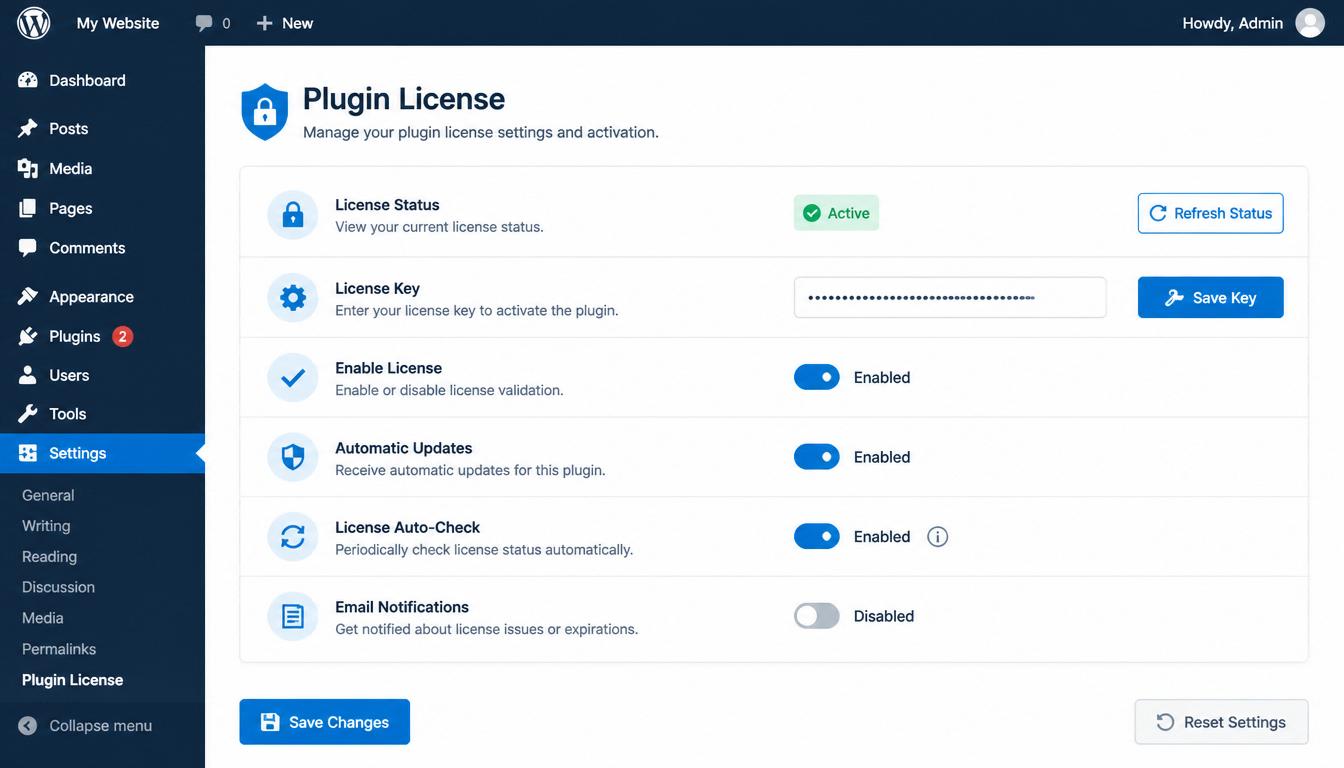
AT13 uses token-based license verification for updates. Set it once, and the plugin auto-checks for new versions every 30 minutes. Disable updates on specific sites if you're testing. Full control, no surprises.

Migration

If you're upgrading from AT12, AT13 works alongside it during transition. Set up clients on AT13, migrate at your own pace. The new plugin doesn't overwrite AT12 settings—it has its own option namespace.

Ready to Deploy

Download Advanced Themer 13 from your account. Read the developer docs, and start with one staging client site before rolling out. Token setup takes 2 minutes.

The rebuild is complete. Security is baked in. Your workflow will thank you.

Custom PHP Development

Advanced Themer 13 Now Features Secure Plugin Updates

Advanced Themer 13 Now Features Secure Plugin Updates

Advanced Themer 13 Update Announcement

Advanced Themer 13 has been updated with a professional-grade plugin update system that makes staying current easier and safer than ever. Here's what's new.

What Changed

🔔 Built-In Update Notifications

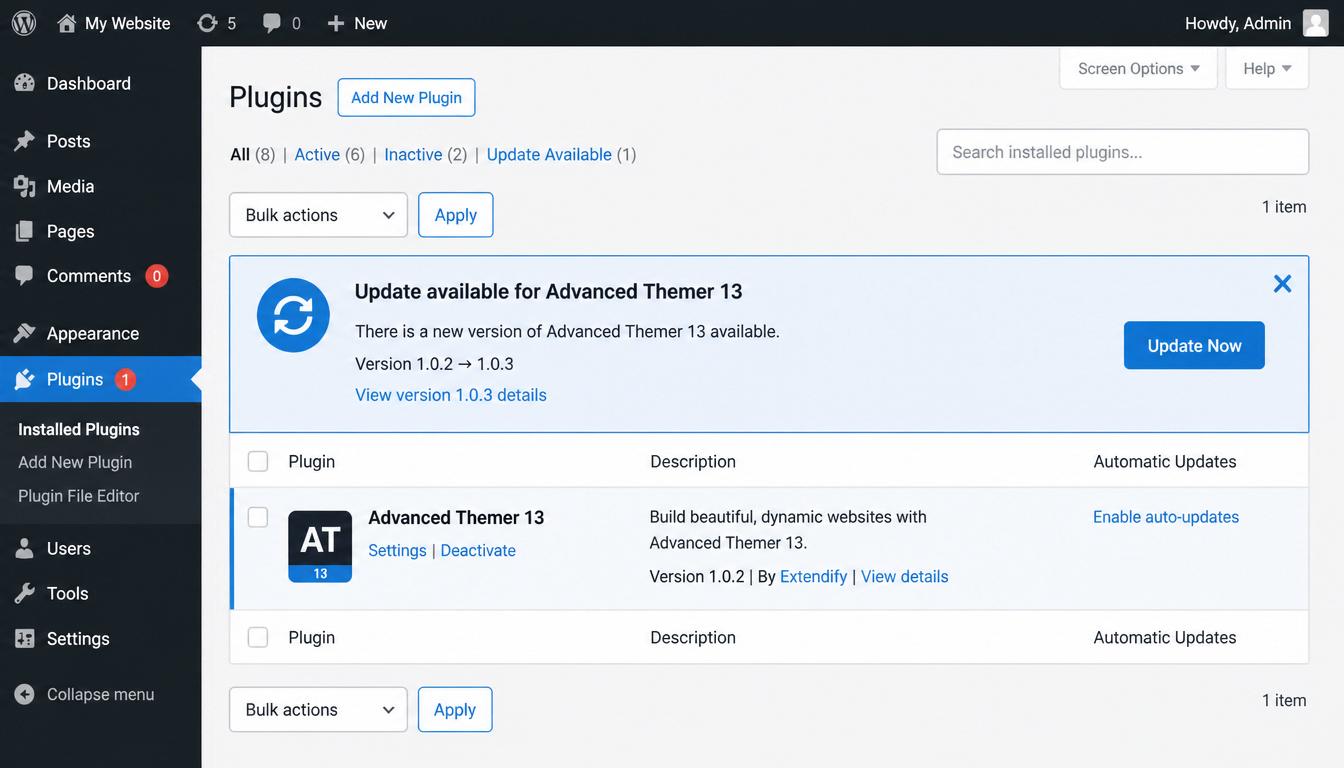
Your WordPress admin now displays available updates for Advanced Themer 13 automatically. No more checking manually or wondering if you're running the latest version.

🔐 License-Based Security

Updates are protected by a unique license key system. This means only authorized installations can download new versions—your plugin stays secure and updates flow only where they should.

⚡ One-Click Updating

When an update is available, install it the same way you'd update any WordPress plugin. Just click "Update" from the Plugins screen. The new version downloads and installs securely.

⚙️ Admin Control

Site administrators can enable or disable automatic update notifications from the Advanced Themer 13 settings page. It's your choice whether to stay on the bleeding edge or take time to test updates before installing.

WordPress Plugins Screen with Update Notification

Why It Matters

Stay Secure. Plugin updates often include security patches. With automatic notifications, you'll know immediately when critical fixes are available.

Stay Compatible. WordPress evolves. Advanced Themer 13 updates ensure compatibility with the latest WordPress versions, PHP releases, and theme changes.

No Surprises. You control when updates happen. The plugin alerts you and waits for your approval—you're never forced to update.

Professional Workflow. Whether you're managing one site or dozens, the new system scales with you. Updates are consistent, reliable, and verifiable.

Admin Settings Panel

How It Works

  1. Check Settings — Visit Advanced Themer 13 → Admin Settings to enable plugin updates (enabled by default).
  2. Get Notified — When a new version is available, you'll see a notification on the Plugins page.
  3. Update When Ready — Click the update button whenever you're ready to install the latest version.
  4. Done — The new version activates automatically.

For Agencies & White Label Users

If you manage multiple client sites, the update system respects your workflow:

Centralized Control — Enable or disable updates per site from the admin panel.

Verified Updates — Every update is verified before installation.

Staged Rollout — Test on one site before rolling out to others.

Multi-Site Management

Looking Ahead

This update marks a shift toward professional-grade plugin management for Advanced Themer 13. Expect more features, faster bug fixes, and smoother updates as we continue to improve the platform.

Ready to upgrade? Advanced Themer 13 with the new update system is available now. If you're already running AT13, the update system is built in—just enable it and start receiving notifications.

Advanced Themer 13 is SolarBlu's professional WordPress theming and administration platform.

Learn more at solarblu.net

SolarBlu
Scroll to Top